


Can I Run Virtual Production on a Remote Machine? The Latency Question
For most virtual production tasks, the answer is yes. For work happening directly in front of the camera, the answer is more restrictive. LED volume render nodes used for in-camera VFX need precise hardware synchronization with the display system, and missing that synchronization can introduce at least one frame of delay. Remote virtual scouting and previs with VCam can work well when network latency stays low enough for comfortable interaction. Tasks such as scene building, lighting between shoot days, Multi-User Editing, and final rendering through Movie Render Queue are also suitable for remote workflows. The important question is not whether virtual production remote workflows are possible. It is whether each task can tolerate the delay introduced by the connection. If a task requires feedback within a single frame, remote access needs much closer evaluation.
People often ask whether virtual production can run remotely as if it were one indivisible process. That question leads to misleading answers. A single project can include frame-critical camera tracking and overnight rendering, and each task has different timing requirements. The real dividing line is latency tolerance, not the software itself.
Table of Contents
What Counts as Latency in a VP Pipeline?
Latency is the time between an action and the visible response. You move a tracked camera, turn an iPad running VCam, or adjust a virtual lens, and the resulting image appears on a monitor or LED wall. Every delay between those events contributes to the total response time. For virtual production, measuring latency in frames can make its impact easier to understand.
At 24 frames per second, one frame lasts approximately 41.7 milliseconds. At 60 frames per second, it lasts about 16.7 milliseconds. A delay of 30 milliseconds may feel manageable when reviewing a virtual location, but it can become disruptive when an operator expects immediate visual feedback during a camera move.
The pipeline also adds latency at several stages. Camera tracking, rendering, video encoding and decoding, network transmission, and display processing all contribute to the final response time. Remote access introduces extra network and encoding work, which can become the largest additional source of delay. Research presented at HCII 2022 by Kavakli identifies input lag, latency, and response time as important challenges in real-time virtual production workflows.
Which Virtual Production Tasks Can Run Remotely?
| Virtual Production Task | Requires ~1-Frame Response? | Suitable for Remote Machines? | Why |
| LED wall render nodes (ICVFX) | Yes, with genlock synchronization | No | Requires Quadro Sync and a direct connection to the LED processor |
| Simulcam / live compositing on set | Yes | No | The composite must keep pace with the physical camera |
| VCam for virtual scouting and previs | Preferably | Depends on RTT | VCam already streams over WebRTC, and remote access adds network latency |
| Multi-User Editing, virtual art department | No | Yes | Each user runs a separate editor and synchronizes changes |
| Lighting and look development between shoot days | No | Yes | Interaction is similar to ordinary scene building |
| Final-pixel rendering through Movie Render Queue | No | Yes | Batch rendering runs without someone watching every frame |
Why the LED Wall Has to Stay on Stage
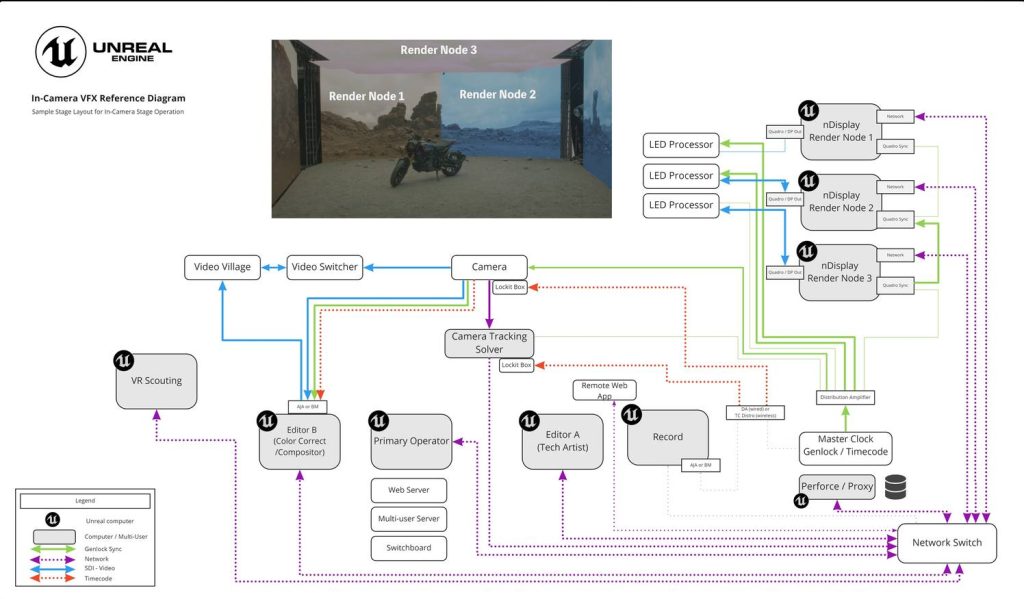
LED wall render nodes need to remain on stage because in-camera VFX depends on precise timing between rendered images and physical displays. Remote GPU access cannot replace the synchronization hardware and local connections required by this setup.
- Software and hardware synchronization: Epic recommends combining genlock and framelock for virtual production. Framelock keeps render nodes working on the same frame, while genlock synchronizes display timing across the system.
- Dedicated synchronization hardware: Epic identifies NVIDIA Quadro Sync as a requirement for synchronized LED volume displays. Each render node needs a synchronization card in addition to its GPU.
- Frame accuracy: Without hardware synchronization, Epic warns that the system can introduce at least one frame of delay. An LED wall can expose this mismatch directly in camera footage.
- Local networking and data: Epic recommends 10-Gigabit Ethernet network interface controllers (NICs) between operator and render machines. Project data should also be stored locally on each machine, reflecting the design of an on-stage network.
For this reason, even a powerful cloud GPU cannot replace the synchronized render nodes required for an LED volume. Services like that are better suited to supporting other parts of the production pipeline.
The Grey Zone: VCam and Virtual Scouting From a Remote GPU
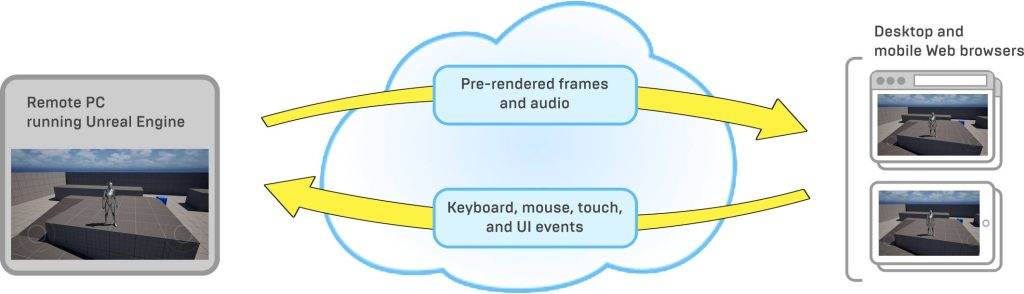
Virtual scouting and VCam for previs can work remotely, provided network latency stays manageable. One important detail is that VCam on an iPad already receives images through Pixel Streaming over WebRTC, even when the rendering PC is in the same room. Epic chose WebRTC to support low-latency communication, but its documentation does not specify a guaranteed delay.
Epic community discussions from 2023 and 2024 include reports of VCam lag on local networks. Users described image updates reaching the iPad more slowly than control inputs reached the application. Replies mentioned latency improvements in Unreal Engine 5.3 and suggested Pixel Streaming settings for UE 5.2, but these reports are community discussions rather than official confirmation of a complete fix.
If VCam already feels delayed on a local network, connecting to a remote machine adds another potential source of latency. Virtual scouting and previs can still work because they focus on evaluating locations and composition, rather than matching every hand movement instantly.
Where Remote Machines Shine: Prep, Collaboration, Final Pixels
Many virtual production tasks can tolerate network latency without affecting the final result. These are the areas where remote machines can add capacity without requiring more hardware on set.
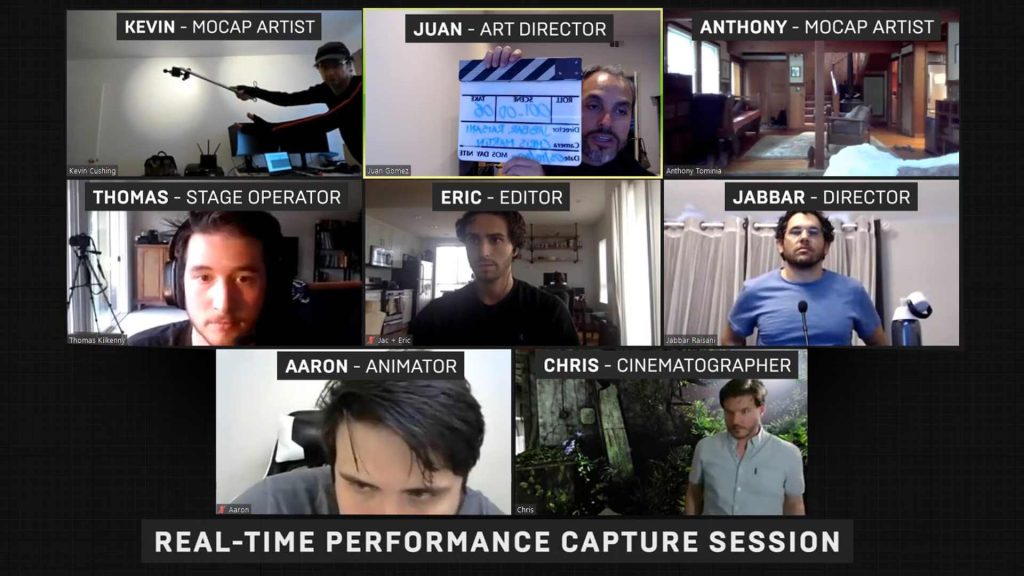
- Multi-User Editing: Multiple Unreal Engine editors can connect to a shared session. In a 2020 demonstration, Epic showed eight participants collaborating remotely, with two performers streaming motion-capture data through Live Link. Netflix and BRON Digital also explored these workflows for remote previs. However, Multi-User Editing is still marked as Beta in Epic’s documentation.
- Environment building and lighting: Artists can prepare environments, adjust lighting, and organize assets before a shoot. Remote desktop access is generally sufficient for these tasks.
- Final pixels and high-quality rendering: Movie Render Queue can process frames in batches after filming. Since nobody needs to react to each frame in real time, network latency matters far less.
For a practical virtual production remote workflow, divide tasks by their latency requirements instead of treating the entire production as one system. Keep enough local hardware for on-stage ICVFX, then rent additional machines when preparation, collaboration, or final rendering demands more capacity.
How to Test Your Own Latency Before You Commit
Before building a remote workflow into your production schedule, test the connection under realistic working conditions. A few practical measurements can reveal whether the delay will interfere with your tasks.
- Measure network ping: Test the connection to your remote machine from the actual work location. Repeat the test several times during normal working hours.
- Measure click-to-photon latency: Record your hand moving a mouse or rotating an iPad alongside the screen using a high-frame-rate camera, such as a phone recording at 240 fps. Count the frames between the input and the visible response.
- Convert the delay into project frames: Compare your measured latency with the project’s frame rate. One frame lasts about 41.7 milliseconds at 24 fps and 16.7 milliseconds at 60 fps.
- Run a realistic scouting session: Test a full 30-minute session before relying on the remote setup for an entire shoot.
These measurements are practical testing suggestions, not a formal certification method. Actual results can vary with network conditions, encoding, and display processing.
iRender: Remote Workstations for Preparation and Rendering
For preparation, collaboration, and final-pixel rendering, a rented workstation can provide extra capacity without requiring you to buy another machine. iRender offers Windows workstations with GPUs such as the RTX 4090 and RTX 5090 32GB, allowing you to install Unreal Engine and work in a familiar environment. Hourly rental can be useful when you need more computing power during the preparation week or after filming, but do not need another workstation permanently.
However, iRender’s machines are hosted in a data center and accessed over the internet, so latency depends partly on the network distance. They cannot replace on-stage render nodes that require extremely precise synchronization with an LED wall. For those tasks, the hardware must remain within the synchronized stage system.
Maximum Speed – Absolute Freedom. Take control of your VFX workflow with iRender’s dedicated GPU servers. Render with iRender →
FAQ
Can I run an LED volume from a cloud GPU?
No. LED volume rendering requires precise synchronization between render nodes and the display system. Technologies such as genlock and NVIDIA Quadro Sync help keep rendered frames aligned with the LED wall. Without proper synchronization, the system can introduce at least one frame of delay, which may cause visible mismatches in camera footage. Cloud GPUs cannot replace this on-stage setup.
Does Unreal VCam work over the internet?
Yes, Unreal VCam can work over the internet because it uses WebRTC to stream images from the rendering machine to a connected device. However, the experience depends on network round-trip time (RTT), connection stability, and additional streaming delays. Remote VCam is suitable for virtual scouting and previs, but it may feel less responsive during live camera work.
What parts of virtual production can be done remotely?
A virtual production remote workflow works well for tasks that do not require immediate visual feedback. Teams can use Multi-User Editing to collaborate on Unreal Engine scenes, build environments, adjust lighting, and prepare assets before a shoot. Final rendering through Movie Render Queue is also suitable for remote machines because it can run without constant supervision. However, frame-critical ICVFX rendering should remain on synchronized hardware at the stage.
How much latency is too much for virtual production?
There is no single latency limit for every virtual production task. For frame-critical work, even a one-frame delay can cause problems, especially when camera tracking and LED wall output must stay synchronized. At 24 fps, one frame lasts about 41.7 milliseconds, while at 60 fps it lasts about 16.7 milliseconds. Test the actual workflow to determine whether the delay is acceptable.
See more: Unreal Engine Cloud Rendering for Film and Virtual Production






No comments