


Rendering Pyro and Volumes with Karma XPU
Volume rendering is one of the easiest ways to push a Houdini GPU beyond its available VRAM. Karma XPU uses both GPU and CPU resources, but volume data does not get the same memory relief as tiled shader textures. When a GPU runs out of memory, XPU can let other available devices finish the frame, including the CPU. For a Pyro sequence, this can create a noticeable performance cliff. Smoke and fire density changes from frame to frame, so the heaviest part of the simulation may require much more memory than the surrounding frames. For a smoother Karma XPU volume render, start by reducing the volume data itself. Lower voxel resolution, crop the cache to the camera, and remove fields that are not needed for shading. If the heavy frames still exceed VRAM, a GPU with more memory or Karma CPU may be the practical answer.
A character scene often has fairly predictable memory usage across a sequence. Pyro behaves differently. A smoke column can grow toward its peak and then dissipate, so VRAM demand follows the simulation rather than staying flat. With XPU, that peak can determine which frames remain GPU-heavy and which ones need CPU resources to finish.
Table of Contents
Why Volumes Hit the Ceiling First
VDBs and other volume data can consume VRAM quickly because the renderer works with voxel grids rather than surface geometry. Increasing the resolution adds voxels throughout the volume, so memory usage can grow much faster than it does with surface geometry. For a heavy Pyro cache, the volume data can become a larger memory concern than the rest of the scene.
A Pyro sequence also does not have one fixed VRAM requirement. Each frame can have a different grid size and density, creating a memory curve across the shot. The bigger problem is that Karma XPU does not provide out-of-core rendering for volume grids. As smoke and fire become denser, the peak frames can exceed the GPU’s available VRAM and slow down. That makes memory one of the main limits to watch when planning a Karma XPU volume render.
What Happens When a Volume Exceeds VRAM
| Renderer | When the Volume Exceeds VRAM | What It Means for a Pyro Sequence |
| Karma XPU | No out-of-core support, falls back to the CPU | Peak simulation frames become significantly slower |
| Karma CPU | Uses system RAM | Safer for extremely heavy Pyro shots |
| Redshift | Volume grids do not use out-of-core rendering | Volume data still reaches a hardware memory limit |
For volume rendering, the real decision is not simply about choosing between GPU renderers. You either keep the cache below the available GPU memory limit, or move the shot to a renderer that can use system RAM. That distinction becomes especially important when the heaviest Pyro frames exceed GPU memory.
Shrinking the Cache Before Anything Else
Before moving to a GPU with more VRAM, you should reduce the volume data first. Several changes can lower memory usage without immediately changing the whole rendering setup.
- Lower voxel resolution: Reduce resolution where possible, starting with areas near the edges or farther from the camera instead of reducing the entire volume uniformly.
- Crop to the camera: Remove volume regions outside the camera view, since unnecessary data can still consume memory when loaded for rendering.
- Remove unused fields: Keep only the volume fields required by the smoke and fire shader. Extra fields add data without contributing to the final image.
- Check the cache format: Make sure the cache uses a suitable format and compression level for the workflow. Large uncompressed caches can add unnecessary storage and loading costs.
- Separate render layers: If the compositing workflow allows it, render the volume separately from the rest of the scene. This can make heavy Pyro shots easier to manage.
Reading the Sequence, Not the Frame
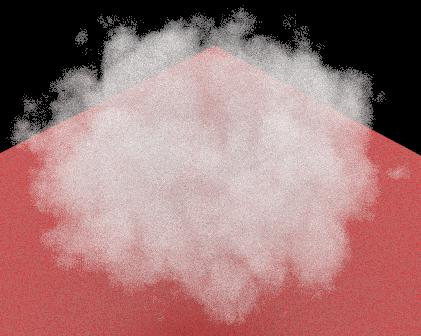
A Pyro sequence can behave very differently from frame to frame because smoke density changes throughout the simulation. A section near the simulation peak may render several times slower than the surrounding frames. You should measure peak VRAM on the heaviest frame, which often appears somewhere in the middle of the sequence rather than at the beginning. Plotting render time against frame number makes the pattern much easier to see.
If the slow section covers only a small part of the sequence, render those frames separately with a different configuration instead of changing the entire job. If most of the sequence sits near the memory limit, moving the whole shot to Karma CPU is usually cleaner than patching individual frame ranges.
Settings Worth Checking in Karma XPU
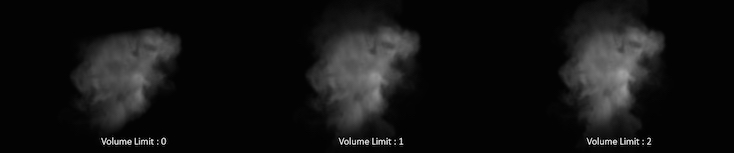
The Volume Limit controls how many times a volumetric ray can propagate through a scene. SideFX documents a range from 0 to 65535. A value above 0 allows volumetric objects to receive indirect light, while higher values can produce more complex light scattering. However, each additional bounce can increase render time significantly. Values above 4 often provide limited visible improvement, so You should increase this setting only when the shot actually needs deeper volumetric light transport.
Volume Step Rate is another setting worth checking for a Karma XPU volume render. The default value is 0.25, which samples roughly one out of every four voxels. A value of 1 samples every voxel, while values above 1 sample the volume more frequently. Increasing it can reduce volumetric noise, but it also increases render time and memory pressure. In most shots, pushing the value beyond 1 provides limited additional benefit, so you should adjust it only after checking the actual noise in the final image.
Remote GPU Testing Before You Upgrade
When a volume has no practical way to escape its GPU memory limit, the VRAM available on each card determines which frames can stay on the GPU. Before considering a hardware upgrade, optimize the scene and cache first. If it still exceeds local VRAM, a remote workstation from iRender with an RTX 4090 24GB or RTX 5090 32GB can be useful for testing the heaviest frames before making a hardware decision.
However, if your Pyro cache exceeds 32GB, no rental configuration will solve the memory limit for a single frame. Multi-GPU machines can render more frames in parallel, but their VRAM is not combined into one larger pool. In that situation, reduce the cache size or move the shot to Karma CPU.
Maximum Speed – Absolute Freedom. Take control of your VFX workflow with iRender’s dedicated GPU servers. Render with iRender →
FAQ
Why does Karma XPU struggle with Pyro and volume scenes?
Karma XPU can struggle with Pyro because volume data is stored as voxel grids, and higher resolution can increase memory use very quickly. Heavy caches may also contain several fields for shading, adding more data to load into VRAM. Since volume grids do not have out-of-core support, peak frames can exceed GPU memory and slow down a Karma XPU volume render.
Does Karma XPU have out-of-core rendering for volumes?
No. Karma XPU does not provide out-of-core rendering for volume grids, so a heavy VDB cache must fit within the available device memory. XPU can use other available devices when a GPU runs out of memory, including the CPU, but this can make the affected frames much slower. For very large volumes, Karma CPU can be a safer option.
How do I reduce VDB cache size for GPU rendering?
Start by lowering the voxel resolution where the extra detail is not visible in the final shot. Crop the volume to the camera view and remove fields that are not required by the shader. You should also check the cache format and compression, since unnecessarily large files can increase loading and memory costs. Test the heaviest frame after each change.
Should I use Karma CPU for heavy volume shots?
Karma CPU is often the safer choice when heavy volume frames consistently exceed GPU memory. It uses system RAM instead of relying on the smaller VRAM limit of a GPU, which can make large Pyro caches easier to render. For a Karma XPU volume render, you should keep the shot on XPU when the cache fits comfortably, then switch to CPU when memory becomes the main limitation.
See more: Karma XPU Feature Gaps: Shadow Linking, Displacement, Dome Lights







No comments