


Redshift vs Karma XPU for Houdini Production
When working on complex Houdini projects, choosing between Redshift and Karma XPU is rarely about which engine renders a basic test frame faster. In a real production setup, the true challenge is how each renderer behaves when your scene grows heavy with detailed models and high-resolution textures. Redshift and Karma XPU handle memory limits, shading networks, and software licensing in completely different ways. In this article, we will walk you through these core differences so you can easily decide which engine best fits your daily workflow and project needs.
Table of Contents
The Memory Architecture Difference
The biggest practical difference between Redshift and Karma XPU is how they manage GPU memory when a scene gets too heavy.
Redshift (Out-Of-Core Rendering)
Redshift uses an out-of-core memory system for textures and geometry. If a scene exceeds your GPU’s physical VRAM, Redshift stores the extra data in system RAM and fetches it over the PCIe bus as needed. Render times will slow down, but the process remains stable and completes without crashing.
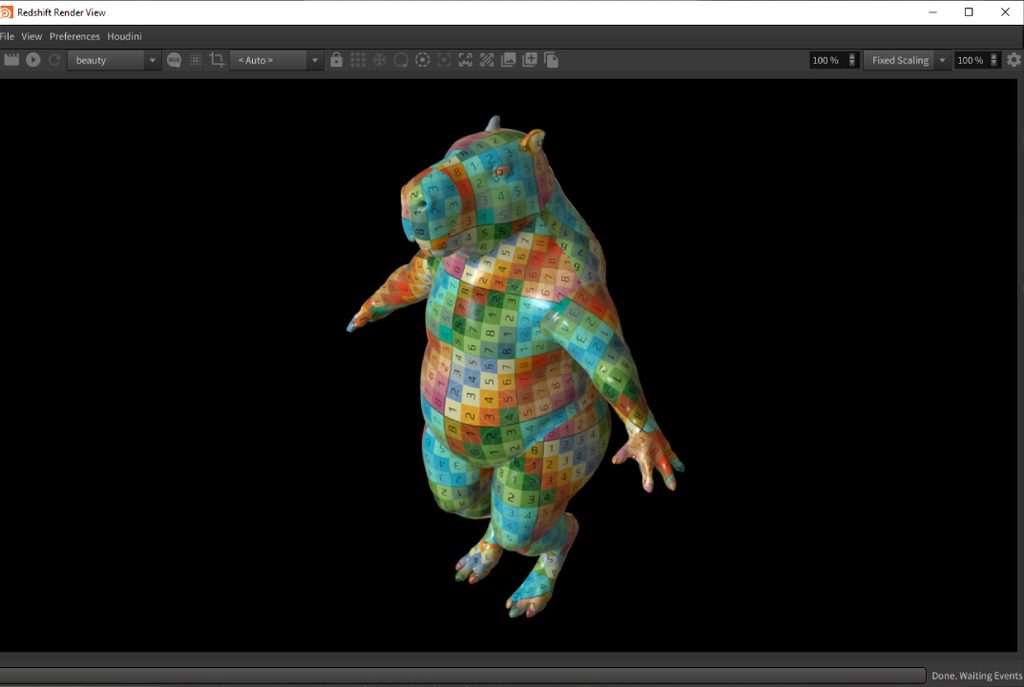
Source: Maxon
Karma XPU (CPU Fallback)
Karma XPU runs on a hybrid engine using OptiX and Embree, but it lacks a full out-of-core system for geometry and textures. When VRAM runs out, Karma XPU offloads processing tasks back to the CPU. In complex production scenes, this CPU fallback can cause render times to drop significantly.
Neither renderer handles VDB volumes and Pyro simulations out-of-core. Maxon documentation notes that volume grids cannot be offloaded to system memory, and Karma XPU faces similar hardware limits with volumetric data. For heavy Pyro shots, your volume cache must fit within physical VRAM on both renderers.

Source: SideFX
Feature Comparison
Here is a quick breakdown comparing Redshift and Karma XPU across key production criteria:
| Feature | Redshift | Karma XPU |
| Engine Architecture | Biased GPU renderer | Hybrid CPU and GPU (OptiX + Embree) |
| Exceeding VRAM (Textures / Geo) | Out-of-core processing with gradual slowdown | CPU fallback, which can cause heavy slowdowns |
| Exceeding VRAM (VDB Volumes) | No out-of-core support for volume grids | Hard hardware VRAM limits |
| Shading Language | Dedicated Redshift Shader Network | MaterialX and USD Preview Surface (No VEX) |
| USD / Solaris Integration | Integrated via plugin | Native Hydra render delegate |
| Licensing | Separate Maxon subscription required | Included directly with Houdini |
| Hardware Support | NVIDIA, AMD RDNA2+, Apple Silicon | NVIDIA GPUs and CPUs |
Choosing by Situation
No single engine wins in every production setup. Your choice should depend on your asset structure and pipeline requirements.
Choose Redshift if your shots frequently exceed physical GPU memory. If you render massive environments, high-resolution hero assets, or heavy texture sets, Redshift out-of-core handling keeps render times manageable. It is also the right choice if your team already owns Redshift licenses and maintains an established Redshift shader library.
Choose Karma XPU if you build your pipeline around native USD and Solaris. Karma XPU acts as a native Hydra render delegate inside Houdini, making it fast and straightforward to set up. It is also ideal for studios looking to avoid extra software subscription fees, since Karma comes included with Houdini.
If your pipeline relies on custom VEX shading, Karma XPU is not an option, because it uses MaterialX and USD standards instead. In that scenario, you can look at Karma CPU or Redshift. For heavy Pyro and VDB simulations, plan your memory carefully regardless of the renderer. You may need to split volume passes into separate layers or use Karma CPU for heavy volume shots.
What to Test Before You Commit a Show
Before choosing a renderer for a new project, test both options on your actual production assets instead of simple benchmark files:
- Pick your heaviest shot: Select your most complex scene file rather than a light, optimized shot.
- Test on the same machine: Render the exact same frame using both Redshift and Karma XPU on the same workstation.
- Track key metrics: Record peak VRAM usage alongside total render times.
- Push memory limits: Intentionally push the scene past your GPU memory limit by using higher-resolution textures or subdividing geometry.
- Watch how each engine reacts: Observe how each renderer handles memory overload to see which one fits your deadline requirements.
Testing Hardware Options with iRender
Testing heavy Houdini scenes requires access to powerful hardware setups. Renting cloud machines allows you to test scene files across different GPU configurations without purchasing new hardware.
iRender offers dedicated cloud servers equipped with up to 4x RTX 4090 (24GB VRAM) GPUs or single RTX 5090 (32GB GDDR7) nodes, paired with AMD Threadripper Pro processors and 256GB of system RAM. Having strong CPU hardware and large system memory is valuable for Karma XPU due to its hybrid engine design. iRender provides flexible server rentals featuring 1x RTX 5090 (32GB GDDR7) nodes at $10.80/hour (discounted to $9.72/hour for rentals of 3 hours or more, with multi-GPU setups coming soon) alongside powerful RTX 4090 servers (up to 8 GPUs) equipped with AMD Threadripper Pro CPUs and 256GB RAM. New users can take advantage of a 100% first-deposit bonus when funding their account within 24 hours of registration, as well as free trial credits and student discounts.
Frequently Asked Questions
- Is Redshift faster than Karma XPU for Houdini?
It depends on the scene memory footprint. When a scene fits entirely inside GPU VRAM, both renderers offer high speed. However, if the scene exceeds available VRAM, Redshift is usually faster because its out-of-core memory system manages textures and geometry over the PCIe bus smoothly. Karma XPU falls back to CPU rendering when VRAM runs out, which can slow down frame completion times.
2. Which renderer handles heavy scenes better, Redshift or Karma XPU?
Redshift handles heavy geometry and large texture sets better due to its mature out-of-core architecture. Karma XPU requires scenes to fit inside GPU VRAM to maintain top hardware performance. However, neither renderer can process heavy VDB volumes out-of-core, so massive Pyro simulations require careful memory management in both engines.
3. Do I need a separate license for Karma or Redshift?
Karma is included directly with your Houdini license, so you do not need to purchase additional software to use it. Redshift is a third-party commercial renderer developed by Maxon, requiring its own standalone or suite license to run inside Houdini.
See more: Karma XPU on Cloud GPU for VFX Sequence



Pingback:Best Render Farm for Houdini in 2026: Karma XPU, Redshift, Mantra and Arnold Compared | 6 November, 2026
|