


Redshift Out-of-Core in Houdini and Why VDB Ignores It
Out-of-core is the mechanism that lets Redshift keep data that does not fit in VRAM in system RAM and pull it across PCIe when the GPU needs it. So a scene larger than the card still finishes instead of stopping. The part most people miss is its scope. It covers textures and geometry, but Maxon states that VDB and volume grids, scene assets and sprite node textures do not use out-of-core. For Houdini artists that detail matters more than any other, because Pyro and VDB work is where memory ceilings get hit most often. On a volume scene, VRAM goes back to being a hard limit. The fix is not another checkbox. It is reducing how much volume data the frame loads, or rendering on a card with more VRAM.
A lot of Houdini artists choose Redshift partly because of out-of-core. Out-of-core is real, and it does what Maxon says it does. It simply does not reach the kind of data Houdini produces in the largest quantities.
Table of Contents
What Out-of-Core Actually Covers
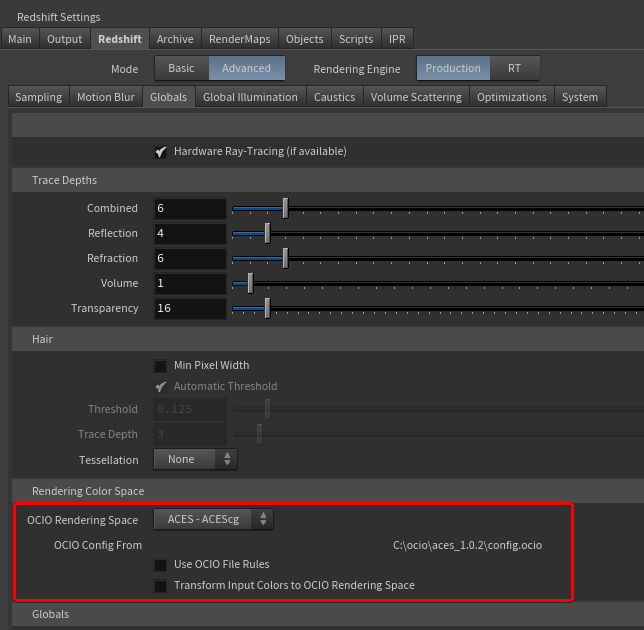
Image Source: Maxon
Textures and geometry are the two categories out-of-core handles. When they exceed the memory on the card, Redshift keeps them in system RAM and fetches what the render needs across the PCIe bus. The frame completes, only more slowly.
PCIe bandwidth is a small fraction of the bandwidth between the GPU and its own memory, so the more a render reaches outside the card, the longer it waits. The penalty is not linear and varies from scene to scene. A frame sitting just over the limit may barely register the difference, while one far over it can crawl. Treat out-of-core as a safety net for the occasional heavy frame. A whole sequence running out-of-core usually means the scene needs work. This is also where Redshift and Karma XPU part ways architecturally. Karma XPU has no out-of-core path at all, and when a GPU device runs out of memory, XPU hands the work to the remaining devices, CPU included.
What Redshift Can and Cannot Move Out of VRAM
| Data type | Out-of-core? | What it means in Houdini |
| Textures | Yes | Heavy UDIM sets and 4K/8K maps still render |
| Geometry | Yes | Dense instancing scenes still complete |
| VDB / volume grids | No | Pyro, smoke and fire: VRAM is a hard ceiling |
| Scene assets | No | Must be counted inside your VRAM budget |
| Sprite node textures | No | Less common, but the same rule applies |
Maxon documents what is excluded without going into the architectural reasons. At a general level, volume data is accessed during rendering in a different way from a texture lookup, and Redshift keeps it resident on the card. We will not speculate beyond that, because the practical consequence is the part that affects your render.
Multiple GPUs do not change the picture. VRAM is not pooled across cards, so every GPU in the machine needs to hold the volume data on its own. A second 24GB card gives you more rendering speed on frames that fit. It does not give you a 48GB ceiling for a heavy VDB.
How to Tell If You Are Already Out-of-Core
- Read the Redshift log. Redshift writes a log for every render, and its memory statistics show how much VRAM was available, how much geometry and texture data was loaded, and whether the render went out-of-core. Pull the log from your heaviest frame rather than whichever one rendered last.
- Watch peak VRAM on the heaviest frame. The first frame of a Pyro sequence is often the lightest, because the simulation has not grown yet. Check GPU memory at the point in the shot where the volume is largest.
- Compare frame times across the sequence. If a heavy frame takes several times longer than a light one and the difference in scene content does not explain it, out-of-core fetching is the likely reason.
- Check the volume data separately. Look at which VDB grids are loaded on your heaviest frame and how large they are. File size on disk is only a rough guide, since compression means the in-memory size can differ. If a frame fails with an out-of-memory error while textures and geometry look fine, the volume is the first suspect, because it has no safety net.
Getting Volume Scenes Under the Ceiling
- Lower voxel resolution where the camera cannot see it. Halving the voxel size multiplies the voxel count by roughly eight, so resolution is the biggest lever you have. A common approach is to simulate at the resolution the motion needs, then resample the grid down with VDB Resample for distant or background shots.
- Clip the volume to the camera. A simulation container is usually far larger than what appears in frame. Clipping the VDB to the camera frustum and pruning inactive voxels removes data the renderer would load and never show.
- Keep only the fields the shader reads. Pyro sims output fields that matter to the solver and not to the render. Density, plus temperature or flame for emission, covers most shaders. Keep velocity only if you render motion blur, and strip the rest before caching.
- Test lower precision. Saving grids at 16-bit shrinks the cache on disk.
- Split the render into layers. Separating smoke from fire, or foreground volumes from background ones, lets each layer stay under the ceiling before you combine them in compositing.
- Move to a card with more VRAM. This is the case where a 32GB card earns its place, since its ceiling sits a third higher than a 24GB card’s.
Testing Your VDB on Two Different Ceilings
Because volumes have no out-of-core path, the VRAM on a single card decides directly whether a heavy Pyro frame renders. iRender rents RTX 4090 machines with up to eight cards, each holding its own 24GB, and a single-card RTX 5090 with 32GB, billed by the minute, so you can load your own VDB cache on both ceilings and compare the logs.
A high-resolution Pyro shot that exceeds 32GB will not render on any rented configuration, and the work at that point is optimising the scene or splitting it into layers.
Maximum Speed – Absolute Freedom. Take control of your VFX workflow with iRender’s dedicated GPU servers. Render with iRender →
FAQ
Q1: Does Redshift out-of-core work with VDB volumes?
No. Maxon’s documentation lists VDB and volume grids among the data types that do not use out-of-core, alongside scene assets and sprite node textures. Textures and geometry can spill into system RAM and be fetched over PCIe, but volume data has to fit in the VRAM of each card. For Houdini Pyro, smoke and fire scenes, that means VRAM works as a hard ceiling. When a volume exceeds it, the frame fails with an out-of-memory error rather than simply rendering more slowly.
Q2: What does Redshift out-of-core actually cover?
Textures and geometry. When those exceed VRAM, Redshift keeps them in system RAM and pulls what the render needs across the PCIe bus, so the frame completes at a slower speed. The slowdown grows with how much data sits outside the card and varies by scene. VDB and volume grids, scene assets and sprite node textures are excluded, so they must fit on the card. VRAM is also not pooled across multiple GPUs, which means each card has to hold that data independently.
Q3: How do I fix Redshift running out of VRAM on a Pyro scene?
Reduce the volume data the frame loads. Lower voxel resolution where the camera cannot see detail, since halving voxel size multiplies voxel count by about eight. Clip the VDB to the camera frustum and prune inactive voxels. Keep only the fields your shader reads, such as density and temperature, and velocity only if you need motion blur. Split smoke and fire into separate render layers. If the scene still does not fit, render on a card with more VRAM, and read the Redshift log to confirm what is using the memory.






Pingback:Lumion Animation and Walkthrough Rendering for Film, Not Just Stills - VFXRendering | 18 October, 2026
|
Pingback:Best Render Farm for Houdini in 2026: Engines and Farms | 7 November, 2026
|
Pingback:Octane vs Redshift in Houdini: Look Dev Compared | 9 November, 2026
|