


The VFX Rendering Pipeline Explained: From Simulation to Final Composite (2026 Guide)
A single frame of a modern blockbuster can take hundreds of CPU and GPU hours to produce. Behind that seamless illusion lies the VFX rendering pipeline: a series of carefully coordinated steps, software systems, and creative decisions to transform raw 3D data into realistic images on screen. This guide will walk you through each stage, from the initial simulation buffer to the final product, with in-depth technical details and practical insights drawn from how leading studios operate in 2026.
Table of Contents
What is a VFX Rendering Pipeline?
A VFX rendering pipeline is the end-to-end production process that converts artistic and technical inputs, such as character rigs, fluid simulations, digital matte paintings, and lighting setups, into finished composited frames ready for color grading and delivery. Think of it as an assembly line where each step adds a layer of realism, until the final image is indistinguishable from photography.
Let’s walk through the VFX rendering pipeline, stage by stage.
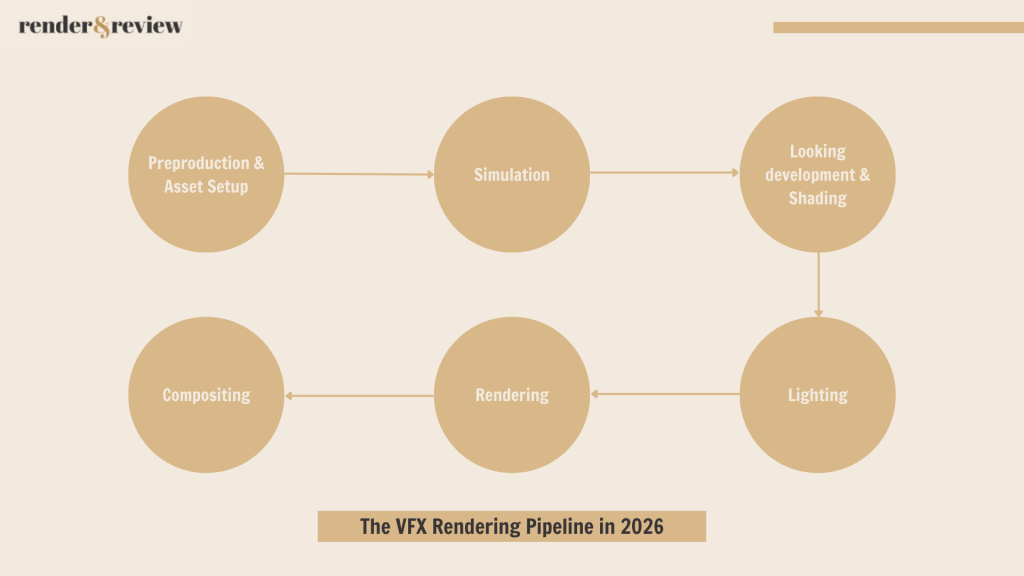
Stage 1: Pre-Production & Asset Setup
Everything downstream depends on the quality of assets built in pre-production. his stage encompasses concept art, 3D modelling, UV layout, rigging, and the establishment of the pipeline’s technical foundation. Decisions made here like naming conventions, coordinate systems, shading models, USD structure will affect every subsequent part and are very costly to change.
In modern studios, the Universal Scene Description (USD) format developed by Pixar has become the backbone of scene assembly. USD allows different departments – modeling, rigging, FX, lighting – to contribute to the same scene non-destructively. In 2026, USD is no longer optional; it’s the de facto standard for any studio working at scale.
Scene assembly involves:
- Loading character rigs and geometry caches
- Attaching material assignments and look development data
- Placing hero assets against environment geometry
- Setting up camera data from virtual production or pre-vis
A poorly assembled scene at this stage will compound into hours of wasted render time downstream. Asset optimization, such as polygon reduction, proxy geometry for non-hero elements, LOD (Level of Detail) systems, must be enforced here, not fixed later.
Stage 2: Simulation
Simulations are computationally expensive by nature and must be completed before the lighting and rendering phase begins. The output of simulation is almost always a cache file that gets read back during rendering rather than computed on-the-fly.
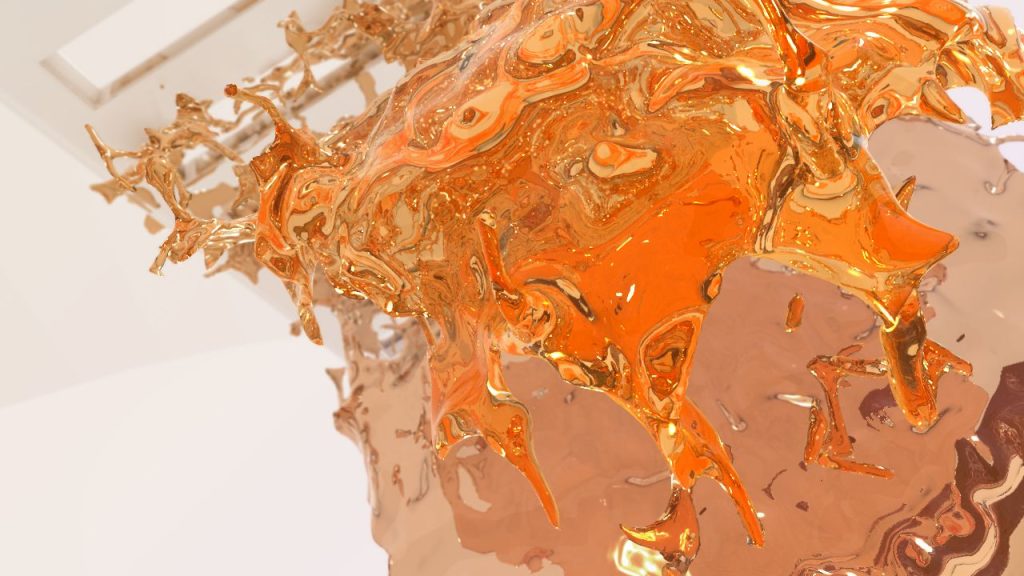
Types of VFX Simulation
- Fluid Simulation
Tools like Houdini’s FLIP solver and PhoenixFD remain industry workhorses for fire, smoke, water, and explosions. In 2026, SideFX’s Karma renderer deepened its integration with Houdini’s simulation stack, making it easier to render volumetric simulations directly without exporting to a separate renderer.
- Rigid Body Dynamics (RBD)
Used for destruction effects – crumbling buildings, shattering glass, falling debris. High-resolution RBD simulations can produce millions of fragments, each with their own transform cache.
- Cloth and Hair
Character cloth simulation (Marvelous Designer, nCloth, Houdini Vellum) and hair dynamics (Houdini Vellum, XGen, Ornatrix) are simulated at this stage. These caches feed directly into the shading and rendering phases.
- Particle Systems
Sparks, dust, magic effects, rain – particle simulations are lightweight relative to fluid sims but still require careful cache management at scale.
- Key Deliverable: Simulation Caches
The output of this stage is a set of cache files – Alembic, VDB (for volumetrics), or proprietary formats. These caches represent geometry and data at each frame and are referenced by the lighting and rendering scenes. A 10-second shot at 24fps might require hundreds of gigabytes of VDB cache data alone for a complex explosion.
Stage 3: Looking development & Shading
Look development (lookdev) is where assets receive their final visual identity. A photorealistic dragon, a rain-soaked car, a corroded metal pipe – all of it is defined at this stage through shaders and textures.
- PBR: Still the Foundation
Physically Based Rendering (PBR) shading models remain the industry standard. The key parameters – base color, metallic, roughness, normal, subsurface scattering – are authored in tools like Substance 3D Painter or Mari and exported as texture maps that feed into the renderer’s shading network.
- MaterialX: Portability Across Renderers
In 2026, MaterialX has fully matured as the cross-renderer material description standard. Studios can now author a shader once and render it in Arnold, RenderMan, V-Ray, or Karma with consistent results. This is a significant pipeline improvement over the previous decade, where materials often had to be rebuilt for each renderer.
- Sub-Surface Scattering and Volumes
Skin, wax, marble, leaves – any material that light penetrates before scattering back out requires SSS shading. Getting SSS right in lookdev avoids expensive troubleshooting during lighting.
Volumetric materials – smoke, fire, clouds, atmospheric haze – require a different class of shaders entirely. Volume shaders interact with light through scattering coefficients (absorption, scattering, emission), and their complexity is one of the primary drivers of render time in VFX work.
Stage 4: Lighting
Lighting is both an art and a technical discipline. A poorly lit technically perfect scene will read as fake. A beautifully lit slightly imperfect scene will read as real. This is why lighting is one of the most senior disciplines in the VFX pipeline.

- Physical Light Units and HDRIs
Modern renderers like Arnold, RenderMan, V-Ray, and Karma all operate in physical light units (nits, lumens, Kelvin). HDRI (High Dynamic Range Image) dome lights provide image-based lighting that grounds synthetic elements in a believable environment. For exterior shots, sky models like Hosek-Wilkie or Preetham provide physically accurate sun and sky lighting.
- Light Linking and Light Groups
With dozens or hundreds of lights in a complex scene, light linking controls which objects are affected by which lights. Light groups allow individual lights or sets of lights to be rendered into separate AOVs (Arbitrary Output Variables), which is critical for the compositing stage downstream.
- AI-Assisted Denoising Changes the Equation
In 2026, AI denoising (OptiX, OIDN, Altus, Neat Video) is a first-class citizen of the rendering pipeline – not a post-process afterthought. Studios routinely render at 32–128 samples per pixel (dramatically lower than the 2,000+ samples previously needed for clean results) and rely on denoising to reconstruct the final clean image. This has directly cut render times by 70–90% for scenes where denoising is applicable.
The tradeoff: denoising introduces its own artifacts, particularly in motion, hair, and firefly-prone scenes. Lighting TDs must validate denoising output carefully, not assume it is always correct.
Stage 5: Rendering
Rendering is the process of mathematically simulating the travel of light through the scene to produce a 2D image. Modern VFX rendering uses path tracing: rays are cast from the camera into the scene, bounced from surface to surface according to BSDFs defined by the shaders, and their contributions averaged over many samples to approximate the true global illumination solution.

How Path Tracing Works
For each pixel, the renderer fires multiple camera rays into the scene. Each ray is traced until it hits a surface. The shader determines the probability distribution of outgoing ray directions (the BSDF). A new ray is sampled from this distribution and followed into the scene. If this secondary ray hits a light, it returns a radiance value; if it hits another surface, the process repeats. The final pixel color is the Monte Carlo average of all sample paths.
With few samples, you see noise – speckled graininess from the high variance of individual paths. With many samples (hundreds to thousands per pixel), the average converges to the correct solution. This is why render time is directly tied to sample count, and why AI denoising is so commercially important.
Major Production Renderers in 2026
| Renderer | Developer | Primary Strength | GPU Support |
| RenderMan 27 | Pixar | Feature film hero renders, subsurface, XPU hybrid mode | Yes (XPU) |
| Arnold 7 | Autodesk | Universal production workhorse, deep Maya integration | Yes (CUDA) |
| V-Ray 7 | Chaos Group | Arch-viz, generalist, strong GPU performance | Yes (CUDA/RTX) |
| Karma XPU | SideFX | Native Houdini, FX-heavy shots, OpenCL/CUDA | Yes |
| Redshift | Maxon | GPU-first speed, commercial and broadcast pipelines | Yes (primary) |
| Cycles X | Blender Foundation | Open source, indie and broadcast, OptiX/Metal | Yes |
AI-Accelerated Denoising
AI denoisers trained on millions of clean/noisy image pairs can reconstruct a clean frame from as few as 8–64 samples, reducing render times by 4–16× while preserving fine detail. As of 2026, temporal denoisers that leverage velocity vectors and previous-frame data achieve clean, stable results across animated sequences without the flickering artifacts that plagued early AI denoisers. The primary denoisers in production use are NVIDIA OptiX AI Denoiser, Intel Open Image Denoise (OIDN), and renderer-native equivalents. All major production renderers now ship with integrated denoising.
Stage 6: Compositing
Compositing is the final stage where all render passes are assembled into the finished frame. It is also where VFX elements are integrated with live-action plate footage – the defining challenge of film and television VFX.
The Compositing Stack
Nuke (Foundry) remains the industry standard compositor for high-end VFX. DaVinci Resolve Fusion and After Effects serve lower-budget and broadcast pipelines respectively.
A compositor’s typical workflow:
- Load the multichannel EXR from the render output
- Separate render passes using shuffle nodes
- Reconstruct a beauty image from passes (allows individual pass adjustment)
- Integrate CG elements with live-action plates using color matching, grain matching, and edge treatment
- Apply depth-based atmospheric effects using the Z-pass
- Add motion blur using motion vector passes
- Perform final color corrections, vignettes, and lens effects
- Output to a color-managed delivery format
Color Management: ACES in 2026
ACES (Academy Color Encoding System) is now effectively universal in high-end VFX production. All renders are output in ACES color space, all comps are performed in ACES, and all deliverables are transformed to the appropriate output color space at the final step. This ensures color consistency from the moment an asset is textured to the moment a frame is delivered to a client.
Real-Time Compositing Tools
In 2026, tools like Unreal Engine’s Composure and Notch have enabled real-time compositing for broadcast and live production contexts. While these don’t replace Nuke for feature film work, they’ve opened a new class of hybrid pipelines where pre-rendered assets are composited live during broadcast events.
Industry-Standard Tools in 2026
The VFX pipeline is served by a mature and evolving ecosystem. Below is a comprehensive overview of main tools in active studio use as of 2026, organized by pipeline stage.
| Pipeline Stage | Primary Tools | Notes |
| Modelling / Sculpting | Autodesk Maya, ZBrush 2026, Blender 4.x, Cinema 4D 2026 | ZBrush for high-res sculpt; Maya for production-ready topology |
| Rigging & Animation | Maya, MotionBuilder, Cascadeur, Unreal Engine (previs) | Cascadeur gaining traction for physics-assisted keyframe animation |
| Simulation (FX) | Houdini 21, Bifrost for Maya, Marvelous Designer (cloth) | Houdini is the undisputed standard for production FX simulation |
| Texturing | Adobe Substance 3D Painter, Foundry Mari, Quixel Mixer | Mari preferred for hero film characters; Substance for everything else |
| Shading / LookDev | Houdini Solaris, Maya + MaterialX, Omniverse | MaterialX increasingly used for renderer-agnostic shading |
| Lighting | Houdini Solaris + Karma XPU, Maya + Arnold 7, RenderMan 27 | GPU lighting previews now standard in all major applications |
| Rendering | Pixar RenderMan 27, Autodesk Arnold 7, Chaos V-Ray 7, Redshift | GPU for iteration; CPU for final hero renders at top quality ceiling |
| Render Management | AWS Deadline 10, OpenCue, SideFX Tractor | Cloud integration standard in all three; bursting to AWS/GCP/Azure common |
| Compositing | Foundry Nuke 16, Blackmagic Fusion 19 | Nuke dominates feature VFX; Fusion growing in broadcast and indie |
The Role of Render Farms in the Modern VFX Pipeline
At its core, a render farm is a cluster of machines – render nodes – each independently processing one or more frames in parallel, coordinated by a render management system (RMS) like Deadline or OpenCue. The RMS handles job distribution, failure retries, priority queuing, and dependency enforcement: simulation caches must finish before lighting renders begin, lighting renders must finish before compositing can start.
In 2026, GPU-based farms dominate the majority of VFX workloads. Modern high-VRAM GPUs deliver path-traced results at 5 to 20 times the performance of comparable CPU setups, making GPU the default choice for most studios. CPU farms still serve a role for scenes that exceed GPU VRAM limits — dense geometry, large VDB caches, or complex procedural shading networks. Many productions run hybrid farms to cover both cases.
For studios that cannot justify the capital cost of on-premise hardware, cloud render farms have become the practical standard. Services like iRender, Fox Renderfarm, and GarageFarm allow artists and studios to access hundreds of GPU nodes on demand, pay only for actual usage, and scale instantly to meet crunch deadlines – without maintaining any physical infrastructure. This elasticity is particularly valuable for independent artists and mid-sized studios where workload is unpredictable.
One critical point: render farm capacity cannot be an afterthought. Decisions made in lookdev, FX simulation, and lighting directly determine frame render time. Across a 300-shot sequence, the difference between an optimized and an unoptimized scene can determine whether a production ships on schedule or not.
Looking Ahead: What Changes the Pipeline Next
The VFX rendering pipeline in 2026 is not static. Three developments are actively reshaping it:
Neural Rendering and NeRF Integration
Neural Radiance Fields and related neural rendering techniques are being integrated into production pipelines for environment capture and novel view synthesis. Expect this to become a standard pipeline component for environments within two to three years.
AI-Assisted Look Development
Generative AI tools are beginning to accelerate material authoring and lookdev iteration. Artists describe materials in natural language or reference images, and AI-generated shaders serve as starting points rather than final outputs.
Hybrid Real-Time / Offline Rendering
The gap between real-time rendering quality (Lumen, Nanite, path-traced Unreal) and offline rendering quality continues to narrow. The pipeline of the near future may route shots dynamically — real-time for simpler elements, offline path tracing for hero characters and complex lighting.
Conclusion
The VFX rendering pipeline is one of the most technically sophisticated workflows in any creative industry. From the first simulation cache to the last composite adjustment, every decision compounds downstream. Understanding each stage – not just the tools, but the dependencies, the failure modes, and the resource demands – is what separates artists and studios who execute consistently from those who are perpetually in crisis mode.
In 2026, the pipeline is faster, more distributed, and more GPU-dependent than ever before. Render farms – whether on-premise or in the cloud – are the engine that keeps it moving. And for studios that get the pipeline right, the results speak for themselves on screen.
See more:

No comments