


Twinmotion Path Tracer Is Slow. Does Multi-GPU Help?
Yes, multi-GPU can help Twinmotion Path Tracer, but only with supported hardware. Epic reports potential gains of around 50% to 200% when multiple GPUs are connected through the required NVIDIA linking technology. That matters because newer cards, including the RTX 4090, no longer support NVLink. Adding a second RTX 4090 therefore does not provide the same Path Tracer acceleration. Multi-GPU also does not make Twinmotion’s real-time viewport faster. For an animation with hundreds of frames, we would approach the problem differently. Instead of trying to make several modern GPUs render one frame together, split the frame range across multiple machines and render those sections in parallel. This is usually a more practical way to reduce total sequence time when working with Twinmotion path tracer multi GPU.
You have hundreds of Path Tracer frames waiting in the queue, so buying another GPU sounds reasonable. Before spending the money, we need to check how Twinmotion handles that second card. The answer comes down to GPU support, NVLink, and how you plan to render the sequence.
Table of Contents
What Epic Actually Says About Multi-GPU
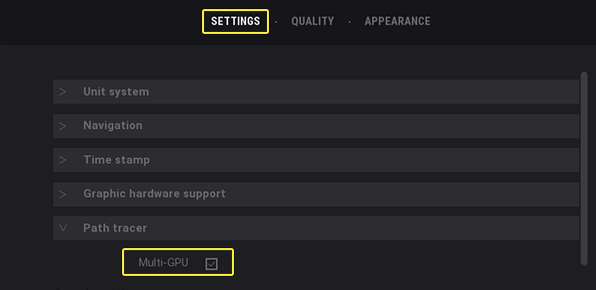
Epic documents a Multi-GPU option for Twinmotion’s Path Tracer, with NVIDIA SLI configurations reported to deliver roughly 50% to 200% faster rendering, depending on the hardware and setup. The feature is available under Path Tracer preferences on supported Windows systems. This applies to Path Tracer, not Twinmotion’s real-time mode.
For the Twinmotion path tracer multi GPU question, the important detail is that this acceleration depends on supported GPU interconnection.
Path Tracer still processes each frame through the available GPU setup, while real-time rendering does not gain the same multi-GPU benefit. Since current hardware has moved away from SLI and NVLink, older benchmark results need to be viewed in context.
The RTX 40 Problem
SLI and NVLink are no longer available on the RTX 40 series. The RTX 4090 cannot be linked to another 4090 for the multi-GPU Path Tracer workflow described by Epic, so the hardware condition behind those 50% to 200% gains is no longer available on this generation.
For anyone considering a Twinmotion path tracer multi GPU setup, buying a second RTX 4090 will not simply halve the render time of one Path Tracer job. If the goal is to make an individual frame render faster, a more powerful single GPU is the more relevant upgrade.
Ways to Shorten a Sequence
| Method | What It Reduces | Limitation |
| A more powerful single GPU | Makes every frame render faster | There is a hardware ceiling, so you can only upgrade the GPU |
| Add another GPU to the same machine without SLI | Does not shorten one job | Useful only when running separate jobs |
| Split the frame range across multiple machines | Shortens the entire sequence | Each machine needs its own copy of the project |
| Reduce samples/bounces for draft passes | Speeds up reviews significantly | Suitable for drafts, not final output |
| Optimize the scene, such as using instances or hiding objects outside the camera view | Reduces workload for every frame | Requires additional preparation |
How Frame Range Splitting Works in Practice
Splitting a sequence across several machines lets each system render a separate frame range at the same time, which can significantly reduce the total delivery time.
- Divide the sequence. Split the frame range according to the number of available machines. For example, 400 frames can be divided across four machines, with 100 frames assigned to each.
- Open the same project. Each machine should use the same project, assets, settings, and software version. Render only the assigned frame range.
- Combine the ranges. Import the completed frame ranges into your editing or compositing software and assemble them in the correct order.
- Check the joins. Review the transitions between ranges, especially when the scene contains changing lighting or other time-dependent effects.
- Consider real-world overhead. If 400 frames take 60 minutes on one machine, four machines could theoretically finish in about 60 minutes when divided evenly. Actual savings will be lower because setup, uploads, downloads, and other overhead add time.
iRender and a Practical Way to Render a Sequence Faster
Because Twinmotion is a live application, a traditional SaaS render farm is not designed to run its interactive workflow. A cloud workstation with a dedicated GPU is more suitable. iRender offers Windows machines with RTX 4090 GPUs and 24 GB of VRAM, so you can run Twinmotion and Path Tracer remotely. Multiple machines can work in parallel, with each one rendering a separate frame range.
The limitation is that one Path Tracer job still runs on one GPU, so a single shot remains limited by the speed of one RTX 4090. Each additional machine also needs its own project copy, which increases preparation time. For a Twinmotion path tracer multi GPU workflow, frame splitting is therefore more useful than simply adding cards to one machine.
Your renders, your rules. Take control of your VFX workflow with iRender’s dedicated GPU servers. Render with iRender →
FAQ
Does Twinmotion Path Tracer support multiple GPUs?
Yes. Twinmotion Path Tracer has supported multi-GPU rendering on compatible NVIDIA hardware, and Epic has reported potential performance gains of around 50% to 200%, depending on the setup. However, the feature relies on older GPU interconnection technologies such as SLI or NVLink. Since newer cards like the RTX 4090 do not support NVLink, current hardware cannot use the same configuration. This limits practical Twinmotion path tracer multi GPU options today.
Will a second RTX 4090 speed up Twinmotion Path Tracer?
No. Two RTX 4090 cards cannot be linked through NVLink, so installing a second card does not make one Path Tracer job render twice as fast. A single RTX 4090 remains responsible for the individual job. If you need to finish a long animation sooner, use multiple machines and assign different frame ranges to each one.
How do I render a long Twinmotion animation faster?
Split the animation into separate frame ranges and render them on multiple machines in parallel. For example, four machines can each handle one quarter of a 400-frame sequence. Keep the project, assets, settings, and software version consistent across the machines, then combine the completed frames afterward. This approach reduces the total sequence time without requiring multiple GPUs to work on the same frame.


No comments