


Why Does Movie Render Queue Take So Long to Render a Sequence?
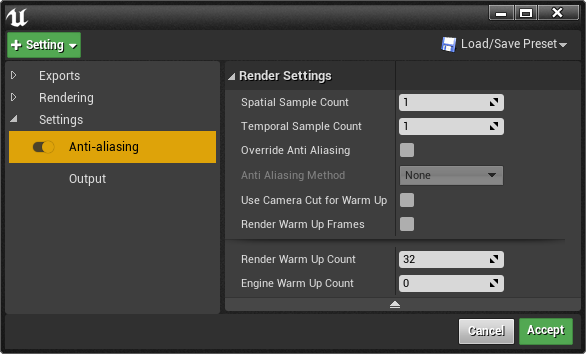
Movie Render Queue can feel surprisingly slow because it does far more work than simply rendering each frame once. For every output frame, Unreal Engine combines multiple spatial and temporal samples to produce a cleaner result. The total number of samples per frame is the Spatial Sample Count multiplied by the Temporal Sample Count. For example, 4 spatial samples and 8 temporal samples require 32 rendering samples for each output frame. MRQ may also use warm-up frames so Lumen, particles, and texture streaming reach a stable state before capture. Higher resolutions add more work, while Lumen and ray tracing can be considerably heavier than viewport rendering. If movie render queue slow is your problem, reducing unnecessary samples and distributing frame ranges across multiple machines can make a major difference.
The viewport can run at 60 fps, yet a single final frame may take several minutes in Movie Render Queue. That can make the renderer seem broken. It is not. The final output is doing much more work, combining many samples into each frame instead of displaying one interactive image.
Table of Contents
MRQ Renders Each Frame Many Times
Movie Render Queue does not render each frame just once. Its anti-aliasing system combines multiple samples to improve edge quality, motion blur, and image stability. When ray tracing is involved, additional sampling can also help reduce visible noise. This extra work is a major reason a movie render queue slow problem can appear even when the viewport feels fast.
Temporal sampling divides the shutter interval into multiple time samples. The engine evaluates the scene at different points within that interval, which creates smoother and more natural motion blur. A higher temporal sample count can improve moving objects and camera movement, but it also increases the amount of work required for every output frame.
Spatial sampling takes multiple samples at the same point in time. It mainly helps with anti-aliasing and can reduce noise in difficult lighting or ray-traced scenes. The important part is how the two settings multiply: 8 temporal samples × 4 spatial samples means 32 rendering samples for one output frame. That multiplication is often the main reason MRQ becomes much slower than the viewport.
What Makes MRQ Slow and How Much Can You Reduce It
| Cause | Why It Takes Time | Should You Reduce It? |
| Temporal Sample Count | Each sample adds another rendering pass. | Reduce it if the scene has little fast movement. |
| Spatial Sample Count | It multiplies the number of renders for each temporal sample. | Reduce it if TSR or DLAA is already handling anti-aliasing well. |
| Warm-up Frames | They run before rendering to stabilize Lumen, particles, and other scene data. | Do not remove them entirely. Adjust them to a sufficient level. |
| Lumen / Ray Tracing | They calculate actual global illumination and ray-traced effects instead of using simpler approximations. | Lower the quality for draft passes. |
| High Resolution (8K) | The image is divided into tiles, and each tile is rendered separately. | Render at 4K and upscale if the final output allows it. |
| Incorrect Console Variables | They can force unnecessarily high quality settings. | Remove or review CVARs with unclear purposes. |
How to Cut Render Time Without Wrecking the Image
There are several ways to reduce render time without sacrificing more image quality than necessary. The goal is to find the lowest settings that still produce a clean, stable result.
- Test your samples first. Render 3 to 4 representative frames at different sample levels and compare them visually. Find the point where additional samples stop making a noticeable improvement.
- Balance temporal and spatial samples. Use more temporal samples when motion and motion blur are important. For detailed static shots, spatial samples may be more useful. Avoid pushing both settings high unless the scene actually needs it.
- Keep warm-up frames practical. Use enough warm-up time for Lumen, particles, and texture streaming to stabilize. Check the first rendered frame for unexpected changes or missing data.
- For Path Tracer shots, increasing Temporal Sample Count can improve temporal stability. A denoiser can also help you avoid pushing the sample count unnecessarily high.
- Clean up unused console variables. Review your configuration and remove CVARs that force quality settings you no longer need.
- Split the frame range when deadlines are tight. Multiple machines can render separate sections of the sequence in parallel, then the completed frames can be assembled afterward.
iRender and a Practical Way to Speed Up MRQ
Movie Render Queue works well as a batch job on a SaaS farm once your preset is finalized. During cinematic iteration, however, a cloud workstation such as iRender lets you open the editor, adjust samples, test the result, and render again. You can also run several single RTX 4090 machines and divide the frame range across them, which can reduce total sequence time when a deadline is tight.
A single machine still renders frames sequentially, so one shot cannot become faster than what one RTX 4090 can deliver. To reduce the total time further, split the sequence across multiple servers. Each server also needs its own project copy and matching setup, so planning the frame ranges carefully is important for a smooth movie render queue slow workflow.
Your renders, your rules. Take control of your VFX workflow with iRender’s dedicated GPU servers. Render with iRender →
FAQ
Why is Movie Render Queue so slow?
Movie Render Queue can be slow because each output frame may require many rendering samples instead of a single render. Spatial and temporal samples multiply the work, while warm-up frames, Lumen, ray tracing, and high resolutions add more processing. If you are troubleshooting a movie render queue slow workflow, test lower sample counts first, remove unnecessary quality settings, and split the frame range across multiple machines when deadlines are tight.
What do temporal and spatial samples do in Movie Render Queue?
Temporal samples divide the shutter interval into multiple points in time, which helps create smoother motion blur and more stable results in moving shots. Spatial samples take multiple samples at the same point in time, improving anti-aliasing and reducing noise. Because the two settings multiply together, increasing both can raise render time quickly, so they should be adjusted according to the needs of each shot.
Should I turn off warm-up frames to render faster?
Not usually. Warm-up frames give Lumen, particles, texture streaming, and other scene systems time to reach a stable state before the final capture begins. Removing them completely can cause problems, especially at the start of a shot. Instead, use the shortest warm-up that produces a stable first frame, then check the result before rendering the full sequence.
See more: Unreal Engine Cloud Rendering for Film and Virtual Production




No comments