


Vray CPU vs Vray GPU: Complete Comparison (2026)
When it comes to V-Ray rendering, one of the most common questions artists ask is: Should I use Vray CPU vs Vray GPU? Both engines are powerful and capable of delivering stunning results, but they are built for different workflows, hardware setups, and project types. In this complete 2026 guide, we’ll break down V-Ray CPU vs V-Ray GPU in detail. Let’s dive in!
Table of Contents
What is Vray CPU?
V-Ray CPU is the classic and most mature rendering engine in the V-Ray ecosystem. It relies entirely on the system’s CPU cores and system RAM to process lighting, geometry, textures, and effects.
Key characteristics of V-Ray CPU:
- Uses CPU cores and threads
- Accesses system RAM (often 64GB–256GB or more)
- Extremely stable for complex scenes
- Supports all V-Ray features
Because of its stability and feature completeness, V-Ray CPU has long been the industry standard for architectural visualization, product rendering, and animation.
What is Vray GPU?
V-Ray GPU is a hardware-accelerated renderer that uses modern graphics cards (NVIDIA GPUs) to dramatically speed up rendering. It supports CUDA and RTX acceleration, allowing artists to take advantage of ray-tracing cores and AI denoising.
Key characteristics of V-Ray GPU:
- Uses GPU VRAM instead of system RAM
- Extremely fast for look-development and final frames
- Supports multiple GPUs for near-linear scaling
- Ideal for tight deadlines and real-time-like workflows
Over the past few years, V-Ray GPU has matured significantly, making it a serious contender for final-quality production not just previews.
Vray CPU vs Vray GPU: Key Differences
Hardware Utilization
- Vray CPU: The central processing unit (CPU) is used for rendering calculations. Its performance is directly proportional to the number of cores and the CPU’s clock speed.
- Vray GPU: Vray GPU leverages the power of the graphics card (GPU) while still requiring the CPU to handle tasks. A major advantage is that Vray GPU can run in hybrid mode, meaning it uses both the CPU and GPU simultaneously to maximize performance. Moreover, Vray GPUs can easily and almost linearly upgrade performance by adding more graphics cards to a computer.
Memory
- Vray CPU: Utilizing system RAM, which is typically large in capacity (32GB, 64GB, or more), makes it easier to process extremely complex footage.
- Vray GPU: V-Ray GPU utilizes the video memory (VRAM) of the graphics card, which typically has a more limited capacity than system RAM (8GB, 16GB, 24GB). However, V-Ray GPU supports NVLink technology to combine the memory of both graphics cards and an “out-of-core” feature to transfer some data to system RAM when VRAM is insufficient.
Supported Features
- Vray CPU: VRay was originally created to work with the CPU, so it possesses the most comprehensive set of features.
- Vray GPU: Although ready for professional production, it still has some unsupported features or operates differently compared to the CPU version. However, this gap is gradually narrowing with each update.
Performance
- Vray CPU: Often has faster rendering startup times than V-Ray GPU, but V-Ray GPU can achieve higher overall processing speeds as the rendering process progresses.
- Vray GPU: Often provides faster interactive feedback during look development, allowing users to make creative decisions more quickly. It also leverages the RT cores on NVIDIA RTX cards to accelerate ray tracing computation by up to 40%.
Note on image results: While both engines aim to produce similar results, the final images may differ slightly due to differences in code implementation and supported features. Footage should be optimized individually for each engine for best results.
A brief about Vray hybrid rendering
Hybrid rendering (or XPU) in V-Ray GPU is a rendering method that allows the system to use both the CPU and GPU simultaneously for image processing. Instead of leaving one of the two hardware components idle, this mode leverages the full computing power available on the workstation to maximize performance.
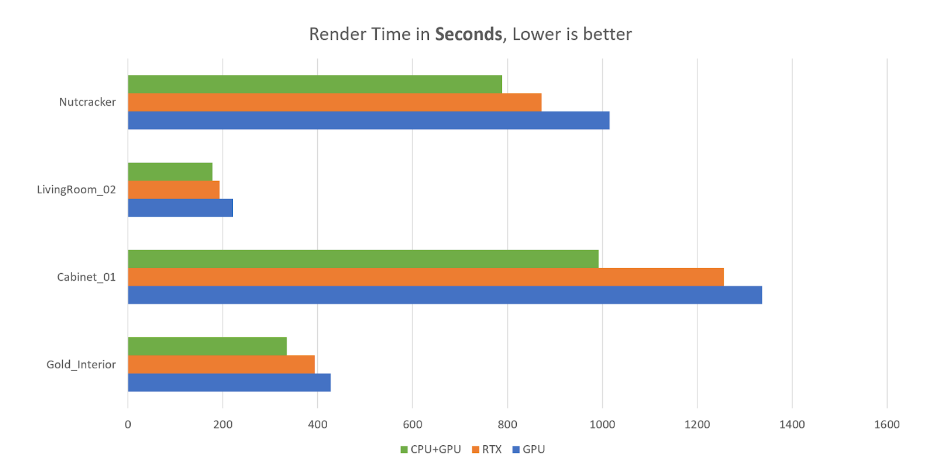
In real-world architecture and animation projects, hybrid rendering can deliver significantly faster rendering times, often 10-30% faster than GPU-only mode, especially for interior scenes with complex lighting.
However, the GPU’s VRAM remains the primary memory limit, meaning scenes still have to fit within the available video memory. When used correctly, V-Ray’s hybrid rendering offers an excellent balance of speed, flexibility, and hardware efficiency, making it a popular choice for modern V-Ray workflows in 2026.
Final Thoughts
The debate between Vray CPU and Vray GPU isn’t about which is better, but which one is a better fit for your workflow.
In 2026, Vray GPU is no longer just a preview tool. It’s a production-ready rendering engine capable of delivering stunning results at incredible speeds. Meanwhile, Vray CPU remains the gold standard for stability and complexity.
Understanding when and how to use each tool will help you achieve the best balance between speed, quality, and cost, especially when combined with modern rendering farm solutions.
Frequently Asked Questions
- Is Vray GPU faster than Vray CPU?
In most cases, Vray GPU is faster than Vray CPU, especially for interior scenes, product visualization, and animation. Thanks to GPU parallel processing and RTX acceleration, Vray GPU can significantly reduce render times. However, Vray CPU may perform better for extremely large scenes that exceed GPU VRAM limits.
- Does Vray GPU produce lower quality than Vray CPU?
No. Vray GPU and Vray CPU can produce virtually identical image quality when properly configured. Both use the same Vray shading system, and differences in output usually come from sampling settings rather than the rendering engine itself.
- When should I use Vray CPU instead of Vray GPU?
You should use Vray CPU when working with very complex scenes, large textures, heavy geometry, or advanced Vray features that are not fully supported in GPU mode. CPU rendering is also preferred when maximum stability is required for long animation renders.
- What is hybrid rendering in Vray?
Hybrid rendering in Vray allows the renderer to use both CPU and GPU at the same time. This helps maximize hardware utilization and can improve render performance by 10–30% compared to GPU-only rendering, as long as the scene fits into available GPU VRAM.
- Which is better for archviz: Vray CPU or Vray GPU?
For most interior archviz projects, V-Ray GPU is often the better choice due to faster feedback and render speed. For large exterior scenes with heavy vegetation and geometry, V-Ray CPU may be more reliable. Many studios use GPU for look development and CPU or render farms for final output.
- Can I switch between Vray CPU and Vray GPU easily?
Yes. Vray allows users to switch between CPU and GPU render engines with minimal changes, making it easy to test performance, quality, and stability depending on the project’s needs.
See more:





No comments