


iRender’s Credit Back: A Smarter Way to Pay for Cloud Rendering
If you’re looking for a GPU render farm that offers more than just performance, the iRender Credit Back program is a feature worth paying attention to. Unlike most render farms that compete purely on speed and pricing, iRender introduces Credit Back as a way to return real value to users after each rendering session. Combined with On-demand Promotions, iRender Credit Back helps artists and studios optimize long-term costs, especially when working at scale.
In this review, we break down how iRender Credit Back and related incentives work, who benefits most, and whether the savings are as significant as they appear on paper.
Table of Contents
Background: what kind of render farm is iRender?
iRender sits in an interesting category – it’s not a traditional “submit-and-wait” render farm. Instead, it operates on an IaaS (Infrastructure-as-a-Service) model, giving artists direct, interactive access to high-performance remote workstations via Remote Desktop. You install your own software, tweak scenes in real time, and maintain full control over your pipeline. Think of it as renting a beefy workstation in the cloud rather than handing off a job to a black box.
This is a meaningful distinction from the SaaS model used by farms like RebusFarm or GarageFarm, where you submit jobs through a plugin and the farm handles everything. Both approaches have merit – but for artists with complex, non-standard pipelines or those needing to run multiple tools simultaneously (say, Cinema 4D alongside Houdini and After Effects in a single session), iRender’s IaaS approach gives a level of flexibility that SaaS simply can’t match.
Configurations go up to 8 × RTX 4090 GPUs, 256 GB RAM, and fast NVMe storage. For heavy Blender, Cinema 4D, Houdini, or Unreal Engine projects, this matters. At the same time, flexible pricing allows you to scale your usage depending on your project size.
The iRender Credit Back system: How it actually works
At its core, Credit Back returns a percentage of what you spend back to your account after each session (both pay-as-you-go and rental plans) The credit-back points could be up to 10% for each usage session. No voucher codes, no minimum spends, no manual redemption. The credits land automatically and can be used immediately on your next session.
Happy Hours vs. Golden Hours
| Happy Hours | Golden Hours |
| Mon – Fri | Sat – Sun |
| 9 a.m – 7 p.m (GMT +7) | All day (GMT +7) |
| 12% credit back | 20% credit back |
For studios or freelancers with schedule flexibility, queuing weekend renders during Golden Hours is the most straightforward way to cut effective cost per frame without changing anything else about your workflow.
A worked example:
| Session duration | 3 hours on weekend |
| Total spend | 45 credits |
| Credit Back rate | 20% (Golden Hours) |
| Credits returned | 9 credits |
| Effective cost | 36 credits |
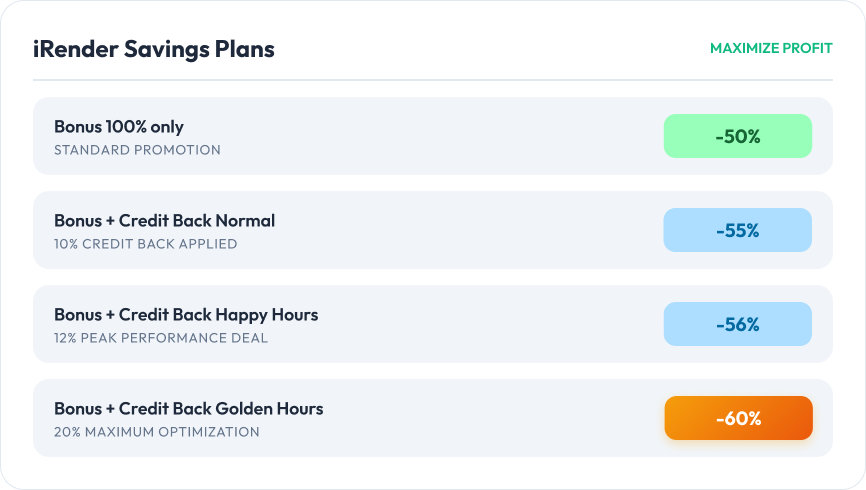
For new users combining the Credit Back program with iRender’s first-time 100% top-up bonus, the effective savings can reach as high as 60% off the standard rate.
On-demand promotions: planning your spend in advance
Beyond Credit Back, iRender also offers promotional top-up packages where you can get up to 25% bonus credits on a single purchase. Unlike platforms that send out random discount codes with little warning, this is entirely on your terms – you decide when to buy and when to top up.
Combining with Credit Back, these On-demand Promotions become a highly useful tool, especially when economic conditions become more challenging.
Who benefits most from this model?
Credit Back rewards volume and timing. The more you render, and the more intentionally you schedule it, the greater the return. That makes it particularly useful for:
- Freelancers with flexible deadlines who can shift heavy jobs to weekends.
- Small studios running overnight or weekend batch renders on Blender, Houdini, or Unreal.
- Artists exploring new pipelines who benefit from the interactive access model to iterate quickly without committing to a full farm submission.
Traditional render farms offer little control over scheduling or cost recovery. iRender’s model flips this – the user holds the levers.
Our verdict
What we like about Credit Back and On-demand Promotions
- Cashback is automatic – credits return to your account after every session with zero manual steps.
- Tiered reward structure (10% → 12% → 20%) incentivizes strategic scheduling without complicating the workflow.
- On-demand Promotions let you lock in up to 25% bonus credits on your own timeline, not the platform’s.
- Both features stack together, meaning regular users see compounding savings across a production cycle.
What to keep in mind
- The 20% Golden Hours rate applies on weekends within GMT+7 – studios in Western time zones may need to adjust their render schedule accordingly.
- The ~60% savings headline requires stacking a first-time 100% top-up bonus with Golden Hours rendering – a combination that applies to new users only.
- On-demand Promotions require upfront credit purchases, which may not suit artists with unpredictable or irregular project timelines.
Get up to 20% Credit Back on every render session — offer ends Aug 2026
iRender’s Credit Back is one of the more transparent cost-reduction systems available in cloud rendering today. For freelancers and small studios who render consistently and have scheduling flexibility, the savings compound meaningfully over time. If you’re evaluating GPU render farms in 2026, iRender deserves a serious look – especially if pipeline control and long-term cost efficiency are priorities.



No comments