


Octane and RTX 5090: What Changed with Blackwell
The RTX 5090 changed the Octane hardware equation, but GPU support is tied closely to the Octane API and plugin version. OTOY’s forum guidance states that older API builds such as 2024.1 are not compatible with RTX 50-series GPUs, while newer 2025.x API builds are required for that generation. The 5090 also brings 32GB of VRAM, which gives Octane more room for large scenes before memory pressure becomes a problem. For Houdini users, however, the plugin version matters more than the standalone application. A standalone build running on a 5090 does not automatically mean your Houdini plugin supports the card. Before renting a machine with an Octane RTX 5090 setup, check the exact plugin and API version you use.
When a new GPU generation arrives, standalone Octane can receive support before individual DCC plugins catch up. That distinction matters in production. If you work in Houdini, check the plugin first rather than assuming that a working standalone installation guarantees compatibility.
Table of Contents
Standalone First, Plugins After
Based on OTOY’s forum discussions, new GPU support can appear in the Octane core and standalone application before the corresponding plugins for individual DCC applications are updated. The rollout is not necessarily simultaneous across every integration.
For Houdini users, the Octane plugin is the important part. A standalone build that recognizes the RTX 5090 does not prove that your installed Houdini plugin can use it. Check the plugin version and its API compatibility before changing hardware.
There is also a practical workaround when a plugin is not ready. OTOY forum users have suggested exporting a scene to .orbx and opening it in standalone Octane for rendering. This can help with testing or temporary work, but it is better treated as a fallback than a normal Houdini production workflow.
The Version Question, Answered Carefully
The version question needs some care because RTX 50-series support depends on the API and plugin combination. OTOY states that the older 2024.1 API is not compatible with RTX 50-series GPUs, while the Houdini 2025.1.0 production plugin was already being tested with the RTX 5090.
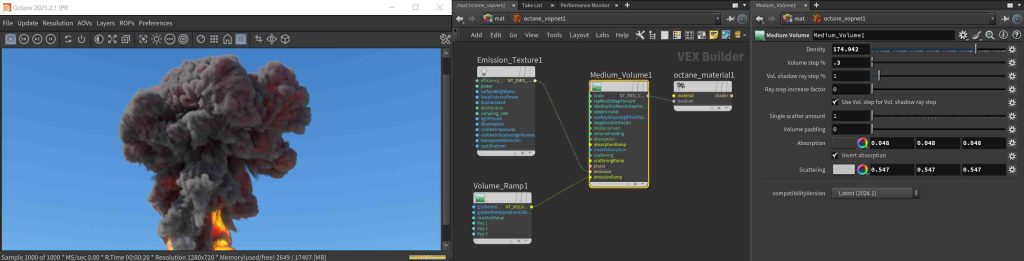
What to Check Before Running Octane on an RTX 5090
| What to Check | Why It Matters | If It Is Wrong |
| Octane plugin version for Houdini | The plugin determines compatibility, not the standalone application | The GPU will not be used |
| Houdini build is on the supported list | Plugins are compiled for specific Houdini builds | The plugin will not load |
| NVIDIA driver | Blackwell GPUs require a sufficiently recent driver | The GPU will be unavailable |
| Octane license | IaaS machines do not include an Octane license | Rendering will not work |
What 32GB Actually Changes for Octane
Octane is highly sensitive to VRAM, so moving from 24GB to 32GB expands the range of medium-sized scenes that can fit directly on the GPU. Octane RTX 5090 setups benefit from this extra headroom, especially when projects contain large textures or complex geometry.
However, VRAM does not add up across multiple GPUs. A multi-GPU system cannot replace the capacity of one card with more VRAM, because each GPU must still hold the data it needs.
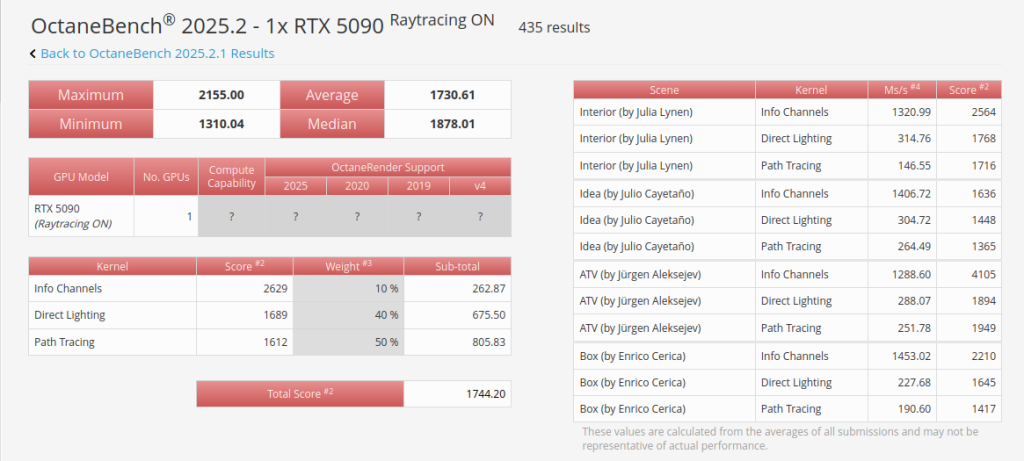
In our OctaneBench checks, one RTX 5090 reaches around 1,731 scores, compared with roughly 1,308 for one RTX 4090. That puts the 5090 about 30% ahead in raw benchmark performance, while the extra 8GB of VRAM also gives it more room for demanding scenes.
iRender: Test Before You Buy
One of the most affordable ways to check whether your Octane setup works with a Blackwell GPU is to rent a machine by the minute instead of buying new hardware. IaaS services such as iRender offer single RTX 5090 32GB machines, alongside configurations with up to four RTX 5090 GPUs, making them useful for testing before committing to a purchase.
The RTX 5090 may require more preparation on your side. Have your project files and software licenses ready before renting the machine, since these are not included with the hardware.
Maximum Speed – Absolute Freedom. Take control of your VFX workflow with iRender’s dedicated GPU servers. Render with iRender →
FAQ
Does OctaneRender support the RTX 5090?
Yes. OctaneRender supports the RTX 5090 with compatible versions and the required NVIDIA driver environment. For an Octane RTX 5090 setup, the important point is to check the Octane version and the DCC plugin version rather than assuming every older release will work. The RTX 5090 also provides 32GB of VRAM, giving Octane more room for demanding scenes that exceed a 24GB GPU’s capacity.
Why does Octane not see my RTX 5090 in Houdini?
The most common cause is an incompatible Octane plugin version or Houdini build. The RTX 5090 requires an Octane version from the supported API generation, while the Houdini plugin must also match the Houdini build it was compiled for. If either one is incompatible, Octane RTX 5090 support may not appear correctly. Check both the plugin version and the exact Houdini build before troubleshooting the GPU itself.
Is 32GB VRAM worth it for Octane?
For larger Octane projects, 32GB can make a meaningful difference because more of the scene can remain directly in GPU memory. Octane can use out-of-core memory when the scene exceeds available VRAM, but performance can drop. The extra capacity is especially useful for heavy textures, detailed geometry, and complex scenes that approach the 24GB limit.
See more: Top 5 Octane Render Farms in 2026 (RTX 5090 Guide)





Pingback:Octane Render Farm 2026: Top 5 Compared for RTX 5090 - VFXRendering | 9 November, 2026
|