


Redshift Multi-GPU Scaling in Houdini: What You Actually Get
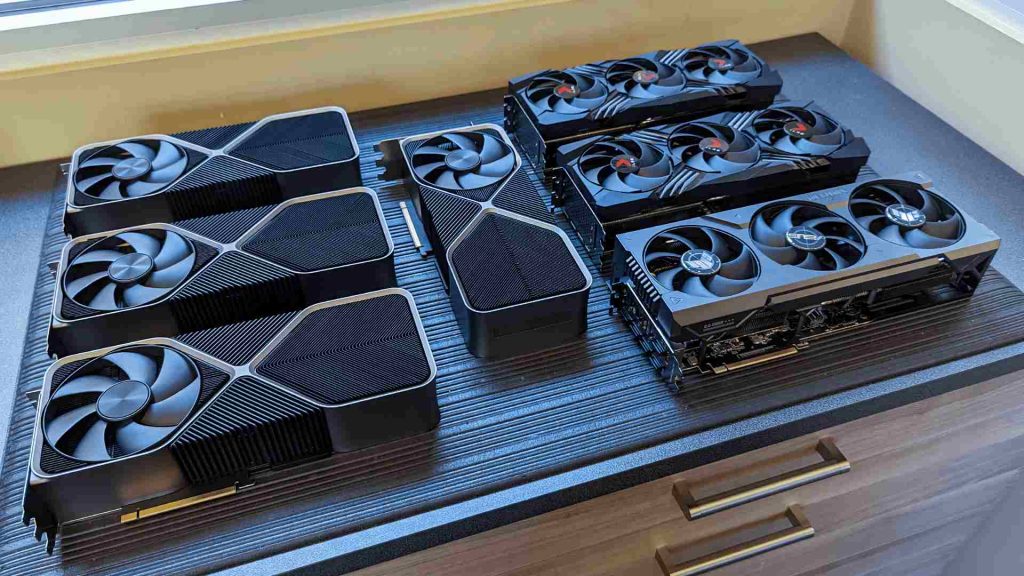
Redshift multi GPU rendering can make Houdini projects finish much faster, but performance rarely scales in a straight line. Adding GPUs increases rendering power, although some tasks still take nearly the same amount of time. A 2022 Puget Systems test using RTX 4090 GPUs reported roughly 4.5 times the performance with seven cards, with smaller gains per card beyond four GPUs. Memory capacity also remains a separate concern. Each GPU needs enough VRAM to handle the scene, so adding cards does not combine their memory into one larger pool. For Houdini and Redshift animation, assigning a separate frame to each GPU can be more efficient because every card renders independently. However, this approach requires enough system RAM to support multiple rendering processes at once.
Buying a second GPU with the expectation of cutting render time in half sounds reasonable, and the result can come close. Yet four GPUs rarely deliver four times the speed. The difference becomes clearer when you compare Redshift 2 GPUs vs 1 on a heavy Houdini scene, where scene preparation and other fixed costs limit scaling.
Table of Contents
What Redshift Does With Extra GPUs
According to Maxon, Redshift can use up to eight compatible GPUs in a single session by default, and you can configure it to use a selected subset of the available cards. Different GPU generations and memory configurations can also work together. During a frame render, the GPUs share the rendering workload, which can reduce the time needed to produce the final image. However, scene loading, geometry processing, and data preparation do not become proportionally faster with every added card. This limits Redshift multi GPU scaling, especially in complex Houdini scenes.
Houdini scenes can require substantial preparation before rendering begins. Heavy caches, instancing, and volumes add work that extra GPUs cannot divide efficiently. This fixed overhead sets a practical limit on scaling.
The Numbers, With Their Caveats
| Number of GPUs | Result | Testing Context |
| 2 | 86% performance increase (Source: iRender article based on Puget Systems tests) | Redshift 3.5.09, RTX 4090 |
| 4 | Approximately 3.4× performance (Source: iRender article based on Puget Systems tests) | Scaling remains effective at this GPU count |
| 7 | Approximately 4.5× performance (Source: Puget Systems’ 2022 test) | PCIe Gen 3 through risers, single-scene benchmark |
| 7 (Octane comparison) | Approximately 6.9× performance (Source: Puget Systems’ 2022 test) | OctaneBench, near-linear scaling |
Speed, Not Capacity: The VRAM Rule
When working with Redshift in Houdini, GPU memory is just as important as rendering speed. Adding more graphics cards does not automatically give your scene more usable VRAM.
- VRAM does not combine across GPUs. Four cards with 24GB each do not provide a single 96GB memory pool. Each GPU still needs enough memory to handle the scene data it processes.
- Redshift out-of-core rendering has limits. It can help manage textures and geometry that exceed available GPU memory, but it does not support VDBs or volume grids in the same way.
- Mixed GPUs can introduce constraints. When cards have different performance levels or memory capacities, the least capable card may limit the practical benefits of the setup.
- RTX 4090 and RTX 5090 do not support NVLink for pooling VRAM. Their memory capacities remain 24GB and 32GB per card, respectively, even in a multi-GPU workstation.
One Frame on Four GPUs, or Four Frames on Four GPUs?
There are two common ways to use multiple GPUs for Houdini rendering. You can assign four GPUs to a single frame, or run four separate rendering processes, with each GPU handling a different frame. Both approaches can reduce overall production time, but they benefit different stages of the workflow.
- Option A: Four GPUs render one frame. Each frame can finish sooner because the GPUs share the rendering workload. However, scene loading, geometry preparation, and data transfer still introduce fixed costs. This approach suits look development, still images, and shots where you need to review results quickly.
- Option B: Four GPUs render four separate frames. Each process uses one GPU to render its own frame. Individual frames may take longer, but total animation throughput can scale more efficiently because scene preparation happens in parallel. This approach suits longer animations with approved settings.
Redshift does not support running multiple rendering processes simultaneously on the same GPU. To run separate tasks on one workstation with a Redshift multi GPU setup, you can use Thinkbox Deadline to assign GPUs to individual tasks through settings such as GPUs Per Task or explicit GPU selection. This allows each process to use its own card.
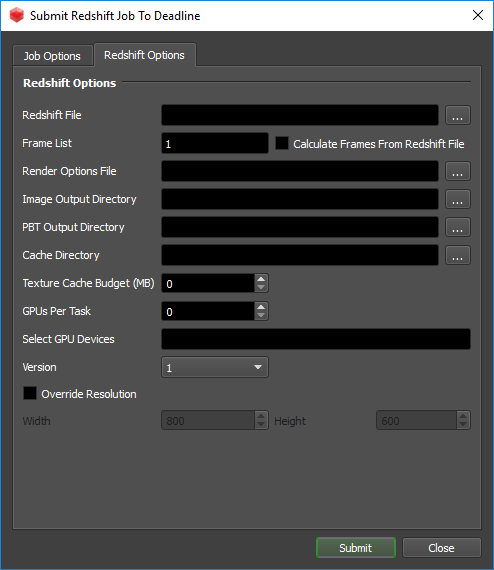
The main costs are system RAM and disk activity. Each process needs memory for its scene, and multiple processes may read the same caches from storage at the same time.
Testing Multi-GPU Rendering in Practice
If you want to test these workflows before investing in your own hardware, iRender offers an 8× RTX 4090 server with 256GB of RAM. You can install your own Houdini and Redshift setup, select the number of GPUs, and compare both approaches using a real scene. For projects that benefit from newer hardware, the RTX 5090 is another option to consider.
However, iRender currently does not offer a configuration with more than 32GB of VRAM per GPU. If your scene requires more memory than that, this may not be the right fit. Remember to include setup time, file preparation, and troubleshooting in your budget, since cloud workstations charge for the time the machine runs.
Maximum Speed – Absolute Freedom. Take control of your VFX workflow with iRender’s dedicated GPU servers. Render with iRender →
FAQ
Does Redshift scale linearly with more GPUs?
Redshift GPU scaling rarely yields perfectly linear performance gains because fixed overhead like scene preparation and geometry loading does not speed up with extra graphics cards. Adding a second GPU offers close to double the rendering speed for heavy Houdini projects. However, seven GPUs reach only about 4.5 times the performance due to diminishing returns.
Does Redshift combine VRAM across GPUs?
No, Redshift VRAM multiple GPUs configurations do not combine memory into a single pool because each card processes scene data independently. For example, four graphics cards with 24GB each still offer only 24GB of usable memory for your scene. Additionally, newer cards like the RTX 4090 and RTX 5090 do not support NVLink for memory pooling.
How many GPUs can Redshift use on one machine?
When configuring your workstation, Redshift multiple GPUs Houdini setups can utilize up to eight compatible graphics cards by default in a single session. You can easily customize settings to assign a specific subset of available GPUs for your workload. Additionally, Redshift comfortably handles mixing different GPU generations and memory sizes within the same machine.
Should I render one frame per GPU for animation?
Yes, adopting a Redshift one frame per GPU strategy is often more efficient for animation renders because scene preparation happens in parallel. This workflow delivers maximum overall rendering throughput across long, production-ready frame sequences. However, running multiple independent rendering processes requires plenty of system RAM to support all active tasks simultaneously.
See more: Redshift for Houdini on Cloud GPU






No comments