


RTX 5090 vs RTX 4090 for GPU Rendering: The Version Trap
The biggest difference between the RTX 5090 and RTX 4090 in real production is not always rendering speed. It is whether your software can actually recognize the newer card. The RTX 5090 uses NVIDIA’s Blackwell architecture, so some renderers require specific software and driver versions before they can use it. Redshift requires a recent 2025 release for official Blackwell support, while experimental support appeared earlier. Octane requires an API 2025.x build because OTOY states that API 2024.1 is not compatible with RTX 50-series GPUs. Karma XPU requires NVIDIA driver 570 or later, with 575+ recommended on Windows. These requirements are central to RTX 5090 render engine support. Before renting a machine, check the GPU, renderer version, and driver together. A new GPU only helps when the entire software stack can use it.
A familiar situation can be surprisingly frustrating. You rent a workstation with the latest GPU, install the renderer you normally use, press Render, and get a message saying that no compatible GPU is available. The card is still sitting inside the machine. The problem is one version number, and that small detail can become the most expensive difference between the RTX 4090 and RTX 5090.
Table of Contents
What Actually Breaks
A Blackwell GPU is useful only when the renderer and driver are new enough to recognize it. Older software does not necessarily render more slowly on an RTX 5090. In some cases, it simply does not see the card at all, leaving you with an unavailable GPU error instead.
On some renderers, the result can be a CPU fallback or a failed render, depending on the software and configuration. Karma XPU, for example, can use both compatible NVIDIA GPUs and CPU resources, while its current documentation requires driver 570 or later.
This is a software compatibility problem, not a lack of GPU power. Moving the same old renderer to another RTX 5090 machine will not fix it. The version stack needs to be checked first.
RTX 5090 RenderEngine Support Version Reference
The table below summarizes several popular render engines and software packages, along with the available information on RTX 5090 support as of October 1, 2026. For Arnold, we could not find an official Autodesk source that specifies a minimum version for RTX 5090 support. Blender also has RTX 5090 results in its OptiX 3.6 benchmark data, but this does not establish an official minimum support version. For reliable RTX 5090 render engine support, we recommend using the latest software and driver versions available, or confirming compatibility directly with the developer before starting a render project.
| Engine | RTX 5090 Support Milestone | Source |
| Redshift | 2025.5.0 official support; 2025.2.2 experimental support; driver 572.16 | Maxon |
| Octane | Requires API 2025.x; API 2024.1 is not compatible | OTOY |
| Karma XPU | Driver 570+; 575+ strongly recommended on Windows | SideFX |
| V-Ray GPU | V-Ray 6 | Chaos Forums |
| Arnold GPU | No official version milestone found from the developer | Autodesk |
| Blender Cycles | No official version milestone found from the developer | Blender Open Data |
The Linux Trap
Linux introduces one more compatibility detail that can be easy to miss. NVIDIA states that Blackwell and later GPU architectures are supported only by its open kernel modules, while the proprietary flavor supports older architectures such as Turing, Ampere, Ada, and Hopper.
For a Linux render farm, installing the correct driver version is therefore not enough. You also need the correct kernel module flavor. If the system is configured with the proprietary module, the Blackwell GPU may not initialize correctly, even when the driver version itself looks correct. NVIDIA also notes that the open and proprietary modules are mutually exclusive, so the choice needs to be handled during installation.
A Pre-Flight Check Before the Clock Starts
Before starting a paid render session, take a few minutes to verify the complete setup. This is especially important for RTX 5090 render engine support, because GPU detection depends on the whole software stack.
- Confirm the GPU: Check whether the machine actually has an RTX 5090 or RTX 4090.
- Check the renderer: Compare the installed version with the support milestones listed above.
- Check the NVIDIA driver: Verify the driver version. On Linux, also confirm that the correct kernel module flavor is installed.
- Check the device list: Open the renderer and make sure it lists the expected GPU. This is the most direct compatibility check.
- Run a test frame: Render a short test before sending the complete sequence. A successful test gives you much more confidence than simply seeing the GPU installed in the workstation.
When the Version Is Fine, What Do You Actually Gain?
Once the software stack fully supports the RTX 5090, its biggest practical advantage over the RTX 4090 is the jump from 24GB to 32GB of VRAM. That extra memory can make demanding scenes possible when the 4090 simply runs out of room.
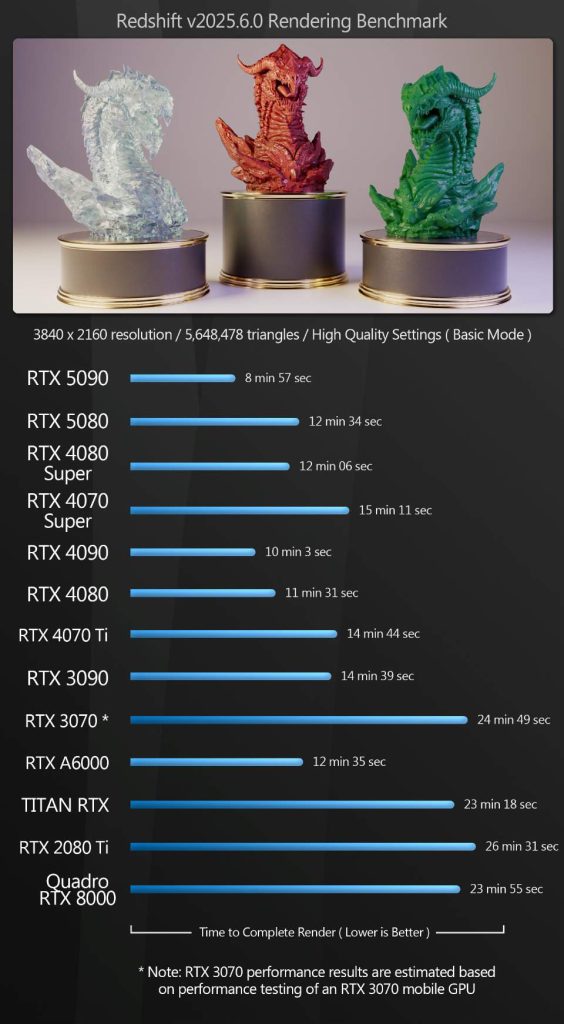
Performance also improves, although the exact gain depends heavily on the renderer and workload. Recent tests show the RTX 5090 around 35% faster than the 4090 in Blender GPU rendering and about 39% faster in V-Ray RTX. Other tests show smaller gains, including roughly 10% in Redshift and 30% in Arnold in a broader Cgchannel comparison. OTOY’s current OctaneBench results also show that benchmark scores vary across submissions, but the gain is about 33% faster in raw performance. However, these figures should be treated as reference points rather than fixed production gains.
There is still one hardware limit to remember: VRAM does not simply combine across GPUs. Adding more cards can increase rendering throughput, but scaling is not perfectly linear, and a scene that exceeds one GPU’s memory still needs to fit within the memory available to the device handling it.
iRender: Test RTX 5090 Compatibility Before Buying Hardware
One practical way to check whether your renderer works with Blackwell is to test it on a rented workstation before buying a new GPU. iRender provides cloud workstations with one or multiple RTX 5090 32GB GPUs, alongside RTX 4090 configurations. CPU, RAM, and storage options are also available for testing or running a complete Houdini, Blender, or other 3D project.
With an IaaS workstation, the software environment is still your responsibility. Having the correct GPU does not guarantee that your renderer version, driver, or other dependencies are compatible. If you start a paid session with an outdated renderer, the time spent troubleshooting can still count toward your rental cost.
For that reason, check the renderer version and driver before starting the render. A short compatibility test can confirm GPU detection before you commit an entire sequence to the machine.
Maximum Speed – Absolute Freedom. Take control of your VFX workflow with iRender’s dedicated GPU servers. Render with iRender →
FAQ
Why does my renderer not detect the RTX 5090?
The most common reason is an incompatible renderer or driver version. The RTX 5090 uses NVIDIA’s Blackwell architecture, which requires newer software support in several renderers. Check the renderer version first, then verify the NVIDIA driver and GPU detection inside the application. On Linux, also check whether the correct NVIDIA kernel module is installed.
Which render engines support the RTX 5090?
Several major GPU renderers support the RTX 5090, including recent versions of Redshift, Octane, Karma XPU, and V-Ray. However, the required version differs between applications. For reliable RTX 5090 render engine support, check the specific renderer version, NVIDIA driver, and operating system requirements before rendering.
Is the RTX 5090 faster than the RTX 4090 for rendering?
In many renderer benchmarks, the RTX 5090 is faster than the RTX 4090, although the improvement varies by application and workload. Recent tests show gains ranging from modest increases in some renderers to much larger improvements in others. The 5090 also has 32GB of VRAM compared with 24GB on the 4090, which can matter more than raw speed for large scenes.
Do I need a special driver for Blackwell GPUs on Linux?
Yes, the Linux setup has an additional requirement. NVIDIA states that Blackwell and later architectures are supported only by the open GPU kernel modules. Installing the correct driver version alone is not enough. If the wrong kernel module flavor is selected, the RTX 5090 may fail to initialize even when the driver itself appears current.
See more: Best Redshift Render Farms in 2026: The RTX 5090 Guide





Pingback:Is One RTX 5090 Better Than Multiple RTX 4090s? - VFXRendering | 23 October, 2026
|