


OctaneRender: Everything you need to know in 2026
If you’re working in 3D, chances are you’ve heard of OctaneRender – or you’re already using it. As we move into 2026, OctaneRender continues to stand out as one of the fastest and most visually impressive GPU render engines on the market. But is it still the right choice today? What’s new, what hardware do you need, and how does it fit into modern pipelines?
In this guide, we’ll break down everything you need to know about OctaneRender in 2026, from features and pricing to hardware requirements and render farm support.
Table of Contents
What’s OctaneRender?
Octane was developed by a New Zealand-based company called Refractive Software, Ltd., and was later taken over by OTOY in 2012, making it one of the earliest GPU-based render engines in the industry. Long before GPU rendering became mainstream, OctaneRender set a new standard for real-time, physically accurate rendering. Over the years, it has evolved into a mature production renderer widely used in motion design, VFX, and commercial projects.
Key strengths:
- Fully GPU-based rendering.
- Spectral lighting for realistic color response.
- Real-time viewport feedback.
- Industry-leading photorealism.
Who uses OctaneRender?
OctaneRender is widely used across multiple creative industries, including:
- Motion designers creating high-end commercials and brand visuals.
- VFX artists working on films, TV series, and cinematic content.
- Architectural visualization studios focused on photoreal interiors and exteriors.
- Product and automotive designers needing accurate lighting and materials.
What’s new in OctaneRender 2026?
In 2026, OctaneRender continues to evolve with a focus on performance, realism, and production scalability. Let’s delve into notable improvements in Octane 2026.1 – the latest version of this render engine.
Gaussian Splatting
Gaussian Splatting allows OctaneRender to capture complex lighting behaviors such as reflections and refractions that change based on the viewing angle. These splats can be generated directly from photos or videos using tools like NeRF Studio or Polycam, making it easier to render highly realistic 3D scenes from real-world data.
New OSL Texture Displacement
Octane’s texture displacement system now supports live shader input, including OSL textures. In OctaneRender 2026, the displacement quality, especially when working with high-frequency details, has been significantly improved, resulting in sharper, more accurate surface details.
Trace Sets
With the new Trace Sets feature, you can control how geometry interacts with other objects in the scene. For example, you can hide an object’s reflection from another reflective surface or prevent an object from casting shadows onto specific geometry. This provides greater flexibility for complex lighting and compositing setups.
Meshlets
Meshlets optimize memory usage by automatically limiting how much geometry data is loaded into VRAM, without any visible loss in quality. This enables ultra-fast rendering of high-resolution 3D scans, heavy subdivision models, and vertex-displaced geometry, ideal for large and complex scenes.
MaterialX and OpenPBR Support
OctaneRender 2026.1 fully supports open material standards, including MaterialX and OpenPBR. With over 130 new MaterialX nodes, artists can now exchange materials more consistently between different rendering and DCC applications.
Neural Radiance Cache
The Neural Radiance Cache improves render performance by using a neural network trained during render time to resolve noise faster. This is especially effective in scenes with heavy indirect lighting, where traditional ray tracing can be slow and inefficient.
Supported Software & Integrations
OctaneRender integrates smoothly with most major 3D applications in 2026, making it easy to fit into existing pipelines.
Popular integrations include:
- Cinema 4D
- Blender
- Maya
- Houdini
- Unreal Engine
- Standalone OctaneRender for custom pipelines
This wide compatibility allows artists to keep their preferred modeling and animation tools while benefiting from OctaneRender’s GPU speed.
Hardware Requirements for OctaneRender in 2026
| Minimum requirements | Recommended requirements | |
| CPU | 8-core CPU | Any modern CPU |
| RAM | 16 GB | 32 GB or more |
| GPU | A CUDA-enabled card with at least 2 GB VRAM | NVIDIA RTX series (RTX 3080, 4090, or newer) |
| VRAM | 2 GB | 12 GB minimum, 24 GB+ recommended for complex scenes |
Pricing & Licensing (2026)
OctaneRender costs €19.99 per month (for annual subscriptions) and €23.95 per month (for monthly subscriptions), allowing artists and studios full access to OTOY’s acclaimed OctaneRender VFX software and ecosystem with unlimited network rendering (10+ nodes) on a flexible monthly plan.
Features included:
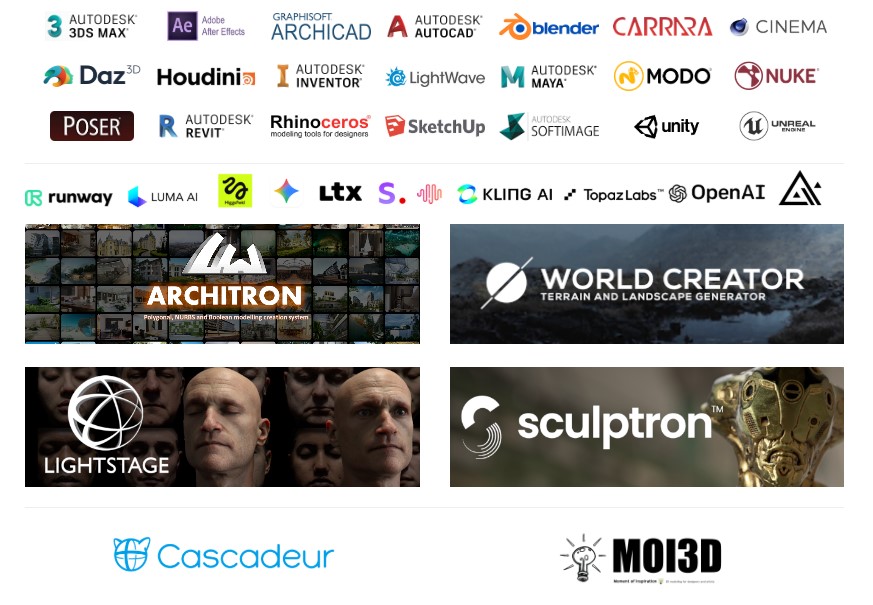
- Creative and modeling tools: World Creator, MoI 3D, Architron®, Sculptron and Vectron.
- Animation and AI: Cascadeur, Render Network & Neural Rendering.
- Resources and Ecosystems: LightStage MetaFaces and MetaBody Scans.
- DCC Plugin Ecosystem: Full access to all plugins for popular graphics software (DCC) such as Blender, Maya, Cinema 4D, 3ds Max, Houdini, and many others.
- Unlimited Network Rendering: Includes over 10 Render Node licenses (no limit on the number of GPUs per machine).
While it’s not the cheapest renderer on the market, many artists find the pricing reasonable given the performance gains and visual quality.
Using OctaneRender with Render Farms
OTOY offers its own decentralized rendering solution known as the RNDR Network (formerly OTOY Render Network). RNDR is built around OctaneRender and allows artists to distribute rendering jobs across a global network of GPU providers using a token-based system.
However, RNDR Network is primarily designed for specific use cases, such as cinematic frames, digital art, and NFT rendering. It is not always ideal for long animations, tight production deadlines, or studio pipelines that require strict version control, predictable performance, and direct technical support.
For these reasons, many professional artists and studios still choose third-party GPU render farms when working with OctaneRender, like iRender, Fox Renderfarm, Rebus Farm.
Benefits of using OctaneRender on a third-party render farm:
- Massive GPU power without hardware investment
- Faster animation rendering
- Scalable resources for peak workloads
- Ideal for studios and freelancers alike
When choosing a render farm, make sure it supports:
- The correct OctaneRender version
- Enough VRAM per GPU
- License handling or bring-your-own-license options
This approach is especially popular for commercial animation and cinematic sequences.
Is OctaneRender Still Worth Using in 2026?
OctaneRender remains a top choice in 2026 for artists who work primarily on NVIDIA GPUs and need fast look development. If you aim for photorealistic or cinematic visuals and want real-time feedback while creating, OctaneRender can be a good choice.
However, if your workflow relies heavily on AMD GPUs or you prefer a more traditional CPU-based approach, other render engines may be worth considering.
Frequently Asked Questions (FAQ)
- Is OctaneRender free?
No. OctaneRender requires a paid subscription, though occasional trial versions may be available.
- Does OctaneRender work on AMD GPUs?
No. OctaneRender is designed for NVIDIA GPUs and does not support AMD GPUs natively.
- Is OctaneRender good for animation?
Yes. With proper optimization and sufficient GPU memory, OctaneRender performs very well for animation, especially when paired with render farms.
- OctaneRender vs Redshift: Which is faster?
It depends on the scene. OctaneRender excels in raw GPU path tracing and realism, while Redshift offers more flexibility and optimization controls for complex productions.
- Can I use OctaneRender on a render farm?
Absolutely. Many GPU render farms support OctaneRender, making it ideal for high-resolution stills and large animation projects.
See more:


No comments