


Hybrid rendering in V-Ray: How it improves performance
In modern VFX and archviz workflows, render speed is no longer just a convenience – it’s a competitive advantage. As scenes become heavier and deadlines tighter, 3D artists constantly look for ways to squeeze more performance out of their hardware. One powerful but often misunderstood feature is Hybrid Rendering in Vray.
So what exactly is V-Ray Hybrid Rendering, and is it worth using in production?
Table of Contents
What’s Vray rendering?
Hybrid rendering allows both your CPU and GPU to render simultaneously instead of choosing one or the other. In traditional workflows, artists had to decide between CPU rendering (stable, memory-flexible) and GPU rendering (fast, parallel processing).
How hybrid rendering works technically
- CPU handling complex calculations, geometry, memory-heavy tasks
- GPU accelerating ray tracing and parallel processing
- Load balancing between CPU cores and CUDA/RTX cores
With Hybrid mode in V-Ray, you can activate both devices at the same time, allowing the renderer to distribute the workload across all available hardware resources.

What’s the difference between:
- V-Ray CPU rendering: uses the CPU’s computing power to compute and render 3D scenes. This mode leverages the CPU’s cores and threads and uses system RAM to process scene data.
- V-Ray GPU rendering: uses the graphics card (GPU) to perform parallel rendering calculations with a large number of processing cores. This mode leverages the GPU’s parallel computing capabilities and uses VRAM (GPU memory) to store the entire scene during rendering.
- V-Ray Hybrid (CPU + GPU together) rendering: allows the CPU and GPU to work simultaneously to render the same frame. V-Ray distributes tasks between the two hardware components to maximize system resource utilization; however, the scene must still remain within the GPU’s VRAM limits.
Benefits of Hybrid rendering in Vray
Maximum hardware utilization
One of the biggest advantages is simple: nothing sits idle. When rendering with GPU-only, your CPU is often underutilized. When rendering CPU-only, your powerful GPU does nothing. Hybrid mode ensures:
- All CPU cores participate
- All CUDA-enabled GPUs contribute
- Workloads are distributed dynamically
For artists working on high-end workstations, this means better ROI from your hardware investment.
Faster rendering time
In many real-world cases, Hybrid rendering is significantly faster. For example, archviz interiors with complex GI, product visualization scenes with heavy reflections or animation sequences with consistent lighting setups…
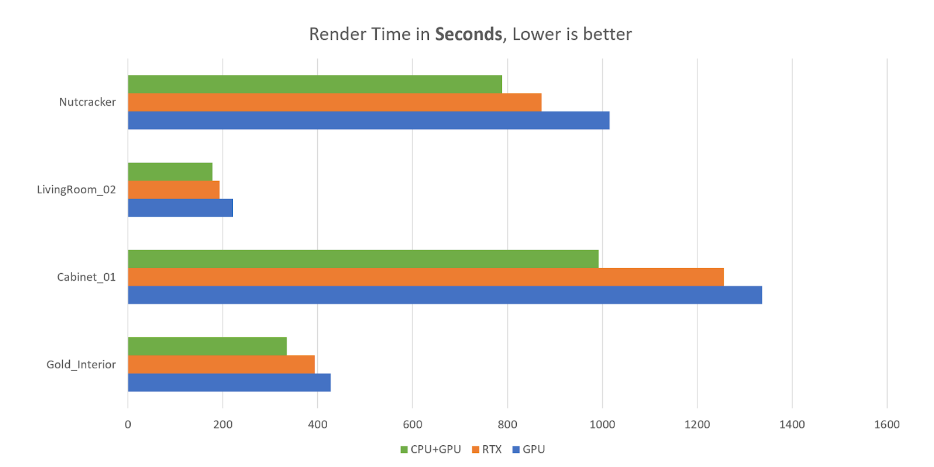
The test, set up with a Ryzen 9 5950X 16-core CPU and an RTX 3090 24GB Founders Edition, unconnected to a monitor, shows the result that the addition of the CPU cores helped reduce render times by 21 – 34%.
CPU fallback capability
While the scene still needs to fit primarily within GPU VRAM, V-Ray can utilize system RAM through its out-of-core memory mechanism and allow the CPU to assist with calculations.
This helps prevent rendering failures in situations where GPU memory alone might not be sufficient. As a result, artists can work with moderately heavy scenes more safely, while still benefiting from GPU acceleration instead of relying entirely on CPU rendering.
Better for mid-tier workstations
Not every artist has 3 – 4 high-end GPUs. Many professionals run on a multi-core CPU or 1 strong GPU.
In this scenario, Hybrid mode becomes extremely valuable. Instead of relying solely on a single GPU, your CPU assists in computation, reducing overall frame time.
If you’re not ready to invest in additional GPUs or a render farm, Hybrid can act as a cost-efficient performance boost.
Efficient for Animation Rendering
For animation rendering, even small performance gains can lead to significant time savings because each frame contributes to the total render time. Over hundreds of frames, these improvements add up quickly.
Hybrid rendering can reduce overall batch render time without requiring changes to the scene setup, making it particularly useful for projects like product commercials, archviz walkthroughs, and motion graphics sequences. In many cases, even a 15% speed improvement can save hours across a full animation render.
Balanced workload for complex lighting
Scenes with multiple light sources, HDRI environments, Global Illumination with multiple bounces, and glossy reflections or refractions often require significant computational power.
Hybrid mode helps balance ray tracing and sampling tasks between CPU and GPU, which can smooth performance in complex lighting conditions.
Final thoughts
Is V-Ray hybrid rendering worth it?
For most 3D artists, yes – but strategically.
Hybrid rendering is not a universal solution, nor does it replace proper hardware scaling. However, it is a powerful optimization tool that allows you to:
- Extract more performance from your current machine
- Shorten render times without additional cost
- Improve workflow efficiency for animation and look development
If you’re serious about optimizing your VFX or archviz pipeline, testing Hybrid mode should absolutely be part of your performance benchmarking process.
Because in production, smarter hardware usage often matters more than simply buying more hardware.
See more:
Thumbnail background: chaos.com



No comments