


Top 5 Best Cinema 4D Redshift Render Farm Comparison
Welcome back to our Render Farm Comparison video. In this video, we’ll take a small project created in Cinema 4D with Redshift and render it across several popular render farms, including Fox Renderfarm, GarageFarm, iRender, RANCH Computing, and RebusFarm.
Join us as we compare performance and results to find out which is the best Cinema 4D Redshift render farm for your scene.
Check more tests from us here:
- Top 5 Best Blender Render Farm Comparison (Still Image)
- Top 5 Best Blender Render Farm Comparison (Multi frames)
Table of Contents
How do we set up for the test?
Let’s take a look at the scene we use for testing today.
- Number of frames: 11 frames
- Resolution: 1920p × 1810p
- Progressive passes: 512
- Noise threshold: 0.005

Since each platform offers multiple render tiers, selecting comparable options was essential to ensure a fair test. For render farms with priority-based queues, such as GarageFarm, RANCH Computing, and RebusFarm, we selected Low Priority for GarageFarm and RebusFarm and Medium Priority for RANCH Computing. Meanwhile, Fox Renderfarm and iRender Farm do not employ a priority system. Therefore, we tested Fox Renderfarm using a GPU RTX 4090 node and iRender Farm with its 4× RTX 4090 GPU package.
Let’s see how fast the render will be and the cost we need to cover in each render farm.
Fox Renderfarm
First, let’s go with Fox Renderfarm.
To begin, we upload the scene using Ray Sync, Fox Renderfarm’s dedicated file transfer tool. Once the upload is complete, the job is configured with Redshift 2026.2.0, RTX 4090 / RTX 5090 GPU nodes, paired with 128GB of RAM with extra 20% expenses added.
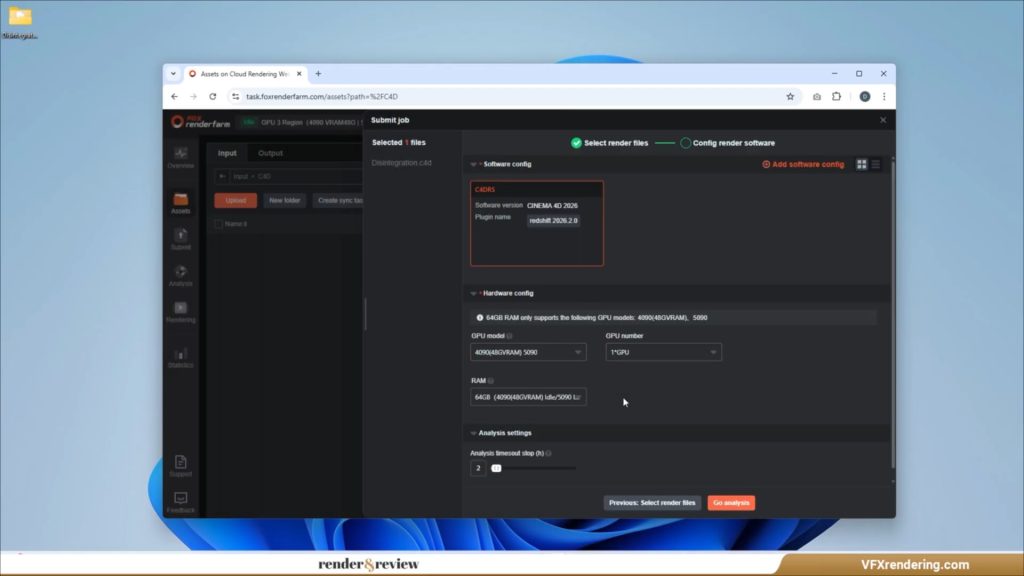
Before launching the render, Fox Renderfarm allows users to review and verify all render settings – an important step to avoid costly mistakes. After confirming everything, the job is submitted and the rendering process begins.
In total, the project required around 2 hours of combined render time. However, thanks to Fox Renderfarm’s multi-node rendering, the actual real-time turnaround was only about 16 minutes. The entire 11-frame sequence was completed at a cost of $9.683, demonstrating solid performance and predictable pricing for small to medium Redshift projects.
Once the render is finished, results can be easily downloaded from the dashboard, completing a straightforward and professional render farm experience.
GarageFarm
Next, we move to GarageFarm.
You will first need to download and install the renderBeamer plugin, which seamlessly integrates with Cinema 4D. Once installed, you can submit your render jobs directly from the software interface, without having to visit their website. It’s very convenient.
From inside the application, we open renderBeamer and click “Beam it up” to upload the project. After the upload is complete, we move to the Web Manager to configure the render settings. GarageFarm offers several GPU options, including NVIDIA A5000, L40S, and RTX 4000 nodes. For this test, we selected 121GB of RAM, which is suitable for memory-heavy Redshift scenes.
There are 3 priorities: Low, Medium and High. In this video, we use the Low priority of GarageFarm, which allows us to use a maximum of 15 nodes for our running render job.
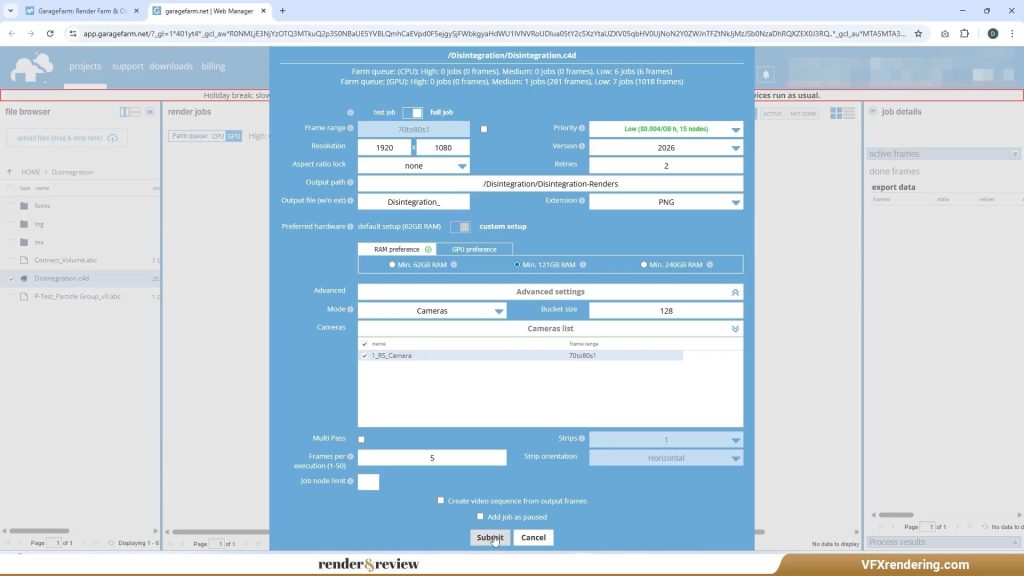
Click Submit, and your job starts rendering. One useful tip: if your job stays in the queue too long, you can increase the priority to move it forward.
In our case, we attempted to switch to High priority to speed things up. However, because the job was originally launched under Low priority, the change did not take effect. Even though the interface displayed “High priority,” the job continued running at the original Low priority level – an important detail to keep in mind when planning your renders.
In the end, it takes around 40 minutes to complete all frames, and costs us $8.41.
iRender Farm
The third render farm featured in our comparison is iRender Farm, a service that stands out with its IaaS (Infrastructure as a Service) model rather than a traditional queue-based render system.
To begin, the project is transferred using the iRender GPU app, which supports a simple drag-and-drop workflow. Once the files are uploaded, we rent a dedicated remote server and use it just like a local workstation. iRender offers a wide range of GPU configurations, and for this test, we selected the 4 × RTX 4090 server, with Cinema 4D and Redshift preinstalled.
The server takes around 5–7 minutes to boot, after which we connect via Remote Desktop. A notable advantage is that iRender provides a free combo license for Cinema 4D and Redshift, which is especially useful if you don’t want to manage licenses on a remote machine. After a quick software check, we can start rendering immediately.
Rendering on iRender feels exactly like working on your own computer. You have full control over the system, can tweak settings freely, and most importantly, monitor the render process in real time.
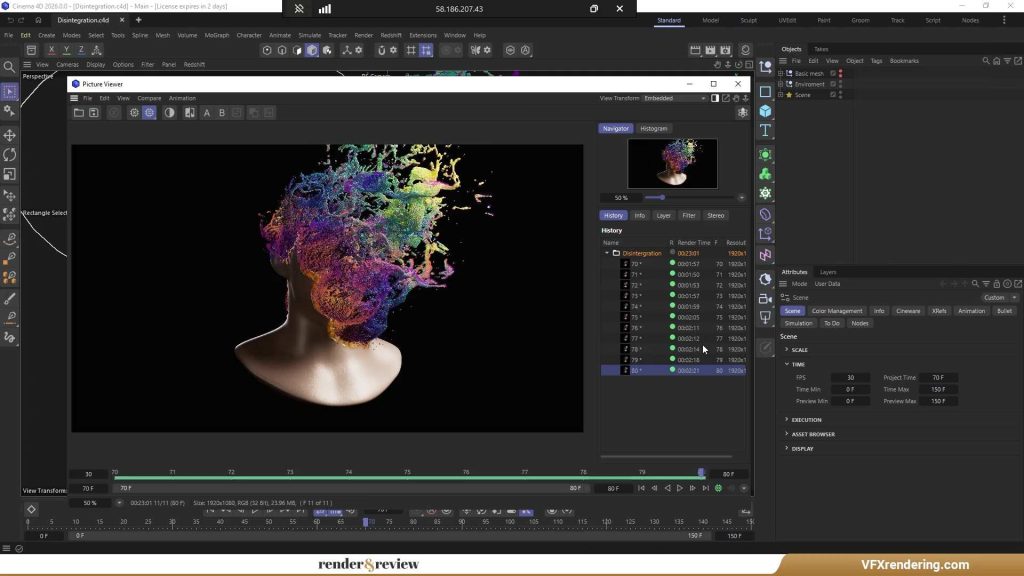
In our test, the total render time was approximately 23 minutes, with each frame taking about 1–2 minutes on average. The cost for this job was $11.50 using the 4 RTX 4090 package, which reflects iRender’s pay-for-what-you-use pricing model.
RebusFarm
The next render farm is RebusFarm.
At this step, we run into an issue. RebusFarm does not support Cinema 4D 2026, so we switch back to Cinema 4D 2025.
When testing the scene using the RebusFarm add-on inside Cinema 4D, several PluginObject error messages appear, as shown on the screen. These errors show up during the pre-check before uploading the project to RebusFarm.

Because of this issue, we’re unable to continue testing RebusFarm in this video. As a result, RebusFarm will not be included in today’s render test.
RANCH Computing
The final render farm in our comparison is RANCH Computing.
To get started, users need to download and install RANCHecker, RANCH Computing’s official plugin for Cinema 4D. Once installed, it integrates directly into the software and performs an important preflight check, automatically scanning the scene for potential errors before it is sent to the render farm. This step helps reduce failed jobs and wasted render credits, especially for complex production scenes.
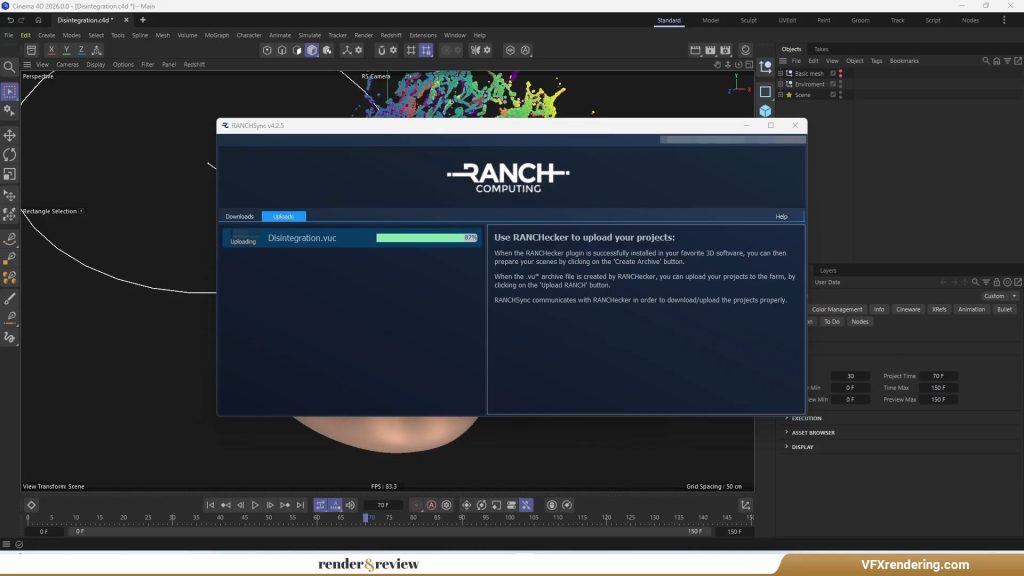
For this test, we selected the GPU-Medium priority, which allows the render job to scale up to 80 GPU nodes. After configuring the settings, the project is uploaded in .vuc format, which is required by RANCH Computing’s system.
Once the upload is complete, RANCH immediately validates the project and pushes it into the rendering queue, with no additional manual steps required. From here, the process is fully automated, users simply wait while the farm handles the rendering.
In our test, the total render time was 14 minutes and 21 seconds, making it the fastest result in this comparison. The job consumed 26.51 render points, equivalent to $31.21.
Test Results
So, we have tested the 11-frame project with C4D and Redshift on 5 render farms. Here are the results.
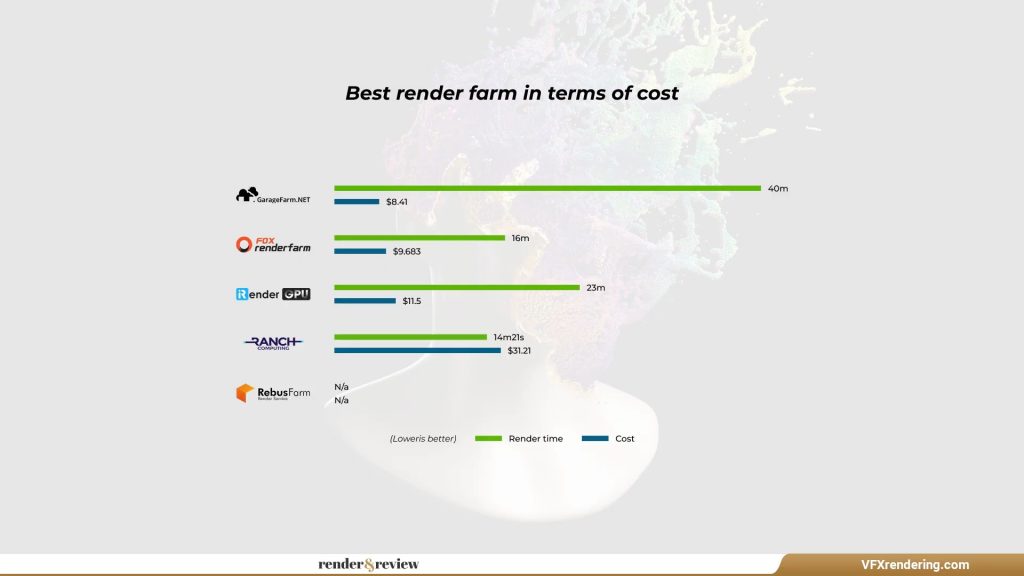
From the results above, Fox Renderfarm and iRender Farm are the two best options for rendering Cinema 4D with Redshift. They offer a good balance between render speed and cost. RANCH Computing delivers the fastest render time, but the price is significantly higher. GarageFarm is the most affordable choice, although its render time is much longer. RebusFarm could not be evaluated in this test due to compatibility issues.
Conclusion
That’s all about our test comparison today. We hope our test results help you choose the right render farm for Cinema 4D with Redshift.
So, following the test results, you can consider these 2 tables ranking as follows:
| Speed ranking | Price ranking |
| RANCH Computing Fox Renderfarm iRender GarageFarm | GarageFarm Fox Renderfarm iRender RANCH Computing |
We’ll keep releasing more render farm comparison videos. If there’s any software you’d like us to test next, let us know in the comments.
Don’t forget to like the video and subscribe to the channel if you found it helpful.
See you in the next one!
- See more: Top 3 best GPU render farms comparison






No comments